GoG EPayslip GRA Tax Report – How to Check Online in Ghana (2026)
If you are a Ghana government employee and you need to check how much income tax has been deducted from your salary, verify your PAYE history, or get proof of tax payment for any official purpose, your GRA Tax Report on the GoG EPayslip portal is where you start. This guide explains exactly what the report contains, how to access and download it, and what to do if something looks wrong.
What Is the GRA Tax Report on GoG EPayslip?
The GRA Tax Report on your GoG EPayslip dashboard is a complete record of all Income Tax (PAYE) deductions taken from your Ghana government salary throughout the year. It shows how much tax was deducted each month and the total amount remitted to the Ghana Revenue Authority on your behalf through the CAGD payroll system.
For every public sector worker in Ghana, income tax is deducted at source before your net salary reaches your account — this is called Pay As You Earn (PAYE). It is separate from your SSNIT contributions and Tier 2 Pension deductions, which also appear on your payslip but go to different places. If you want to understand how all three fit together, our Ghana Salary System 2026 guide breaks down the full deduction structure.
Your GRA tax report is one of the most important documents you have as a government employee. You will need it for annual tax filing, tax clearance certificate applications, and any situation where proof of tax compliance is required.
How to Use Your GoG EPayslip GRA Tax Report for Tax Filing
Ghana government employees are required to file their annual income tax returns with the Ghana Revenue Authority. Your GRA tax report from the GoG EPayslip portal provides the exact figures needed for this process.
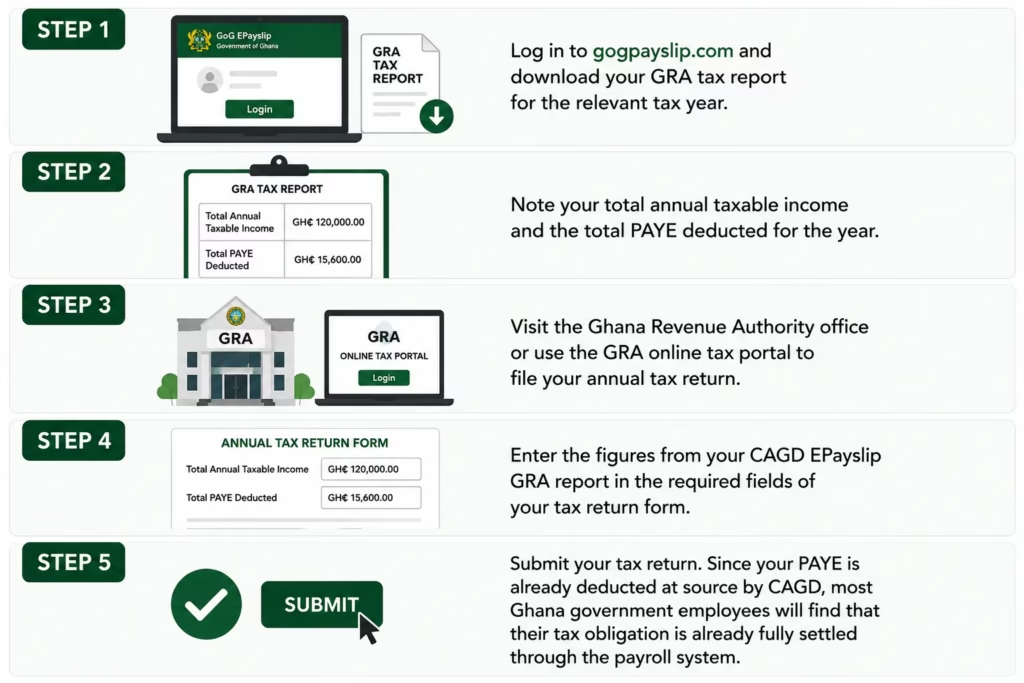
Step 1: Log in to the GoG EPayslip portal and download your GRA tax report for the relevant tax year.
Step 2: Note your total annual taxable income and the total PAYE deducted for the year.
Step 3: Visit the Ghana Revenue Authority office or use the GRA online tax portal to file your annual tax return.
Step 4: Enter the figures from your CAGD EPayslip GRA report in the required fields of your tax return form.
Step 5: Submit your tax return. Since your PAYE is already deducted at source by CAGD, most Ghana government employees will find that their tax obligation is already fully settled through the payroll system.
Common GoG EPayslip GRA Tax Report Problems on GoG EPayslip Ghana
If you are having trouble with your GRA tax report on the GoG EPayslip portal, here are the most common problems Ghana government employees face and how to fix them.
1. Higher Than Expected Tax Deduction:
If your GRA tax report shows an unusually high Income Tax deduction, it is likely due to a salary upgrade, arrears payment or a bonus that temporarily pushed you into a higher GRA tax bracket. If the higher deduction continues without explanation, contact your HR office and the CAGD helpdesk immediately.
2. Tax Deducted But Not Showing in GoG EPayslip GRA Tax Report:
If PAYE appears on your monthly payslip but is not showing in your GRA tax report on the GoG EPayslip dashboard at gogpayslip.com, it is usually a system update delay. Wait a few days and check again. If the problem continues, contact the CAGD helpdesk with your Employee Number.
3. Wrong Tax Calculation:
If your GRA tax report figures look incorrect, check the Ghana Revenue Authority PAYE tax tables for your income level against the figures in your report. If an error is confirmed, use the Wrongful Deductions feature on your GoG EPayslip portal and follow up with your HR office straight away.
4. Missing Tax Records for Previous Years:
If your GRA tax report does not show records for previous years, contact the CAGD helpdesk with your Employee Number and request a full tax history review.
How to Get a Tax Clearance Certificate Using Your GoG EPayslip GRA Tax Report
A Tax Clearance Certificate from the Ghana Revenue Authority confirms that a Ghana government employee has no outstanding tax obligations. You may need this certificate for promotions, international travel or certain financial transactions in Ghana.
Your GRA tax report on the GoG EPayslip portal is your proof that PAYE has been correctly deducted and remitted by CAGD on your behalf every month. Log in to your dashboard at gogpayslip.com, open your My GRA Report section and download your complete GRA tax history.
Take your downloaded GRA tax report to your nearest GRA office along with your Ghana Card and Employee Number to apply for your Tax Clearance Certificate.
Tips for Checking Your GRA Tax Report on GoG EPayslip Ghana
These simple tips will help every Ghana government employee keep their GRA tax report accurate and up to date on the GoG EPayslip portal.
1. Download Your GRA Tax Report Every Year
At the end of every tax year, log in to your dashboard, open My GRA Report, and download your complete tax history. Keep both a digital copy and a printed copy somewhere safe. You never know when you will need to produce proof of tax payment quickly, and having it already downloaded saves a lot of time.
- Cross-Check Your Monthly PAYE
Every month, compare the PAYE figure on your payslip with the entry in your My GRA Report section. If the numbers do not match, do not ignore it — contact the CAGD helpdesk with your Employee Number and flag it straight away. Small discrepancies can add up over time.
- Check SSNIT and Tier 2 Pension at the Same Time
While you are reviewing your GRA tax report, take a few extra minutes to verify your SSNIT contributions and Tier 2 Pension deductions as well. All three should be correctly deducted every month. If any of them look wrong, our Wrongful Deductions guide explains how to report the issue.
- Keep Your Ghana Card Details Current
Your Ghana Card is required for account verification on the portal. If your details are outdated, you may run into OTP problems when trying to access your GRA tax report or other portal features. Keep everything up to date through your HR office.
- File Your Annual Income Tax Return
Even though PAYE is deducted automatically through CAGD, Ghana government employees are still required to file an annual income tax return with the Ghana Revenue Authority. Filing confirms your tax compliance and keeps your GRA records current. Your downloaded GRA tax report from the portal has all the figures you need to complete this.
CAGD EPayslip Helpdesk — Contact for GoG EPayslip GRA Tax Report Issues
If you encounter any problem with your GRA tax records on the GoG EPayslip portal, contact the CAGD helpdesk for assistance.
CAGD Helpdesk Phone Numbers:
CAGD Main Office Phone: +233 (0) 302983507
CAGD Postal Address: P.O. Box M79, Ministries, Accra, Ghana, GPS: GA-110-7376
Portal Access: gogpayslip.com
FAQs
Where do I find my GRA tax report on GoG EPayslip?
Log in to the portal and go to My GRA Report under the Reports and Deductions section of your dashboard. It shows your complete annual Income Tax history broken down by month. If you are having trouble logging in, our GoG EPayslip Login Guide covers the most common access issues.
Do Ghana government employees need to file tax returns if PAYE is deducted automatically?
Yes. Even though PAYE is deducted at source by CAGD, you are still required to file an annual income tax return with the Ghana Revenue Authority. Think of it as confirming to GRA that the amounts deducted match what should have been paid. Your GRA tax report from the portal gives you all the figures you need to complete the return quickly.
What is PAYE on my GoG EPayslip?
PAYE stands for Pay As You Earn. It is the income tax deducted from your salary each month by the CAGD payroll system and sent directly to the Ghana Revenue Authority on your behalf. The rate depends on your income level — Ghana uses a progressive tax system where higher earnings attract a higher rate. Our Ghana Salary System 2026 guide has a full breakdown of the current PAYE tax bands.
How do I get proof of tax payment from GoG EPayslip?
Log in to the portal, go to My GRA Report, select the relevant tax year, and download the report. This document is accepted as proof of tax compliance and shows your complete PAYE payment history. You can use it for tax clearance applications, promotions, or any other situation where proof of tax payment is required.
What should I do if my GRA tax calculation on GoG EPayslip looks wrong?
Start by comparing your PAYE deduction against the current GRA tax tables for your income level. If the figures confirm an error, report it immediately through the Wrongful Deductions section of the portal and follow up with your HR office. You can also call the CAGD helpdesk on 0242162781 if you want to escalate it directly.
What is the GoG EPayslip GRA Tax Report?
It is an online record available on the GoG EPayslip portal that shows all PAYE deductions processed through the CAGD payroll system for your account. It covers your monthly tax deductions, annual totals, and full tax history. You can log in at any time to check, download, or print it — and it is the document you will need whenever GRA or any other body asks for proof of tax payment.
Conclusion
Always download your GRA Tax Report at least once a year and keep a copy somewhere safe. While you are at it, check your SSNIT contributions and Tier 2 Pension deductions on the same visit — it takes a few extra minutes and gives you a complete picture of everything being deducted from your salary each month.
If anything looks wrong, the Wrongful Deductions guide explains how to report it. For a full breakdown of how your salary and all deductions are structured, see our Ghana Salary System 2026 guide.
This website shares independent information about the GoG EPayslip system to help Ghana government employees. It is not officially connected to the Government of Ghana or CAGD.