Easy GoG ePay Services Mobile App Guide 2026 – Download & Login
If you are a Ghana government employee and you want a faster way to check your payslip without opening a browser every time, the GoG ePay Services mobile app is worth having on your phone. It connects directly to the same CAGD payroll system as the main portal — so your payslip, affordability report, GRA records, and deductions are all there in one place.
This guide covers everything you need — how to download and install the app, how to register, how to reset your password, and how to fix the most common problems Ghana government employees run into when using it.
What Is the GoG ePay Services Mobile App?
The GoG ePay Services mobile app is the official mobile version of the CAGD ePayslip portal. It is designed for Ghana government employees who want quick and easy access to their payroll information without having to use a desktop browser.
The GoG ePay Services mobile app is connected to the same system as gogepayservices.com so all your information is the same whether you log in through the app or the website. Your payslips, affordability report, GRA records, and other account details are all available in one place.
GoG ePay Services Mobile App Requirements (Before Installation)
Before downloading the GoG ePay Services mobile app, make sure your device meets the basic requirements. This will help the app run smoothly without errors.
If your device meets these requirements, you should be able to install and use the app without issues.
💡 Note: If the app is not available on your device, you can still use the GoG ePay Services portal directly in your mobile browser.
Is the GoG ePay Services Mobile App Free?
Yes. The GoG ePay Services mobile app is completely free to download and use. There are no subscription fees or hidden charges. You only need an active internet connection to use it.
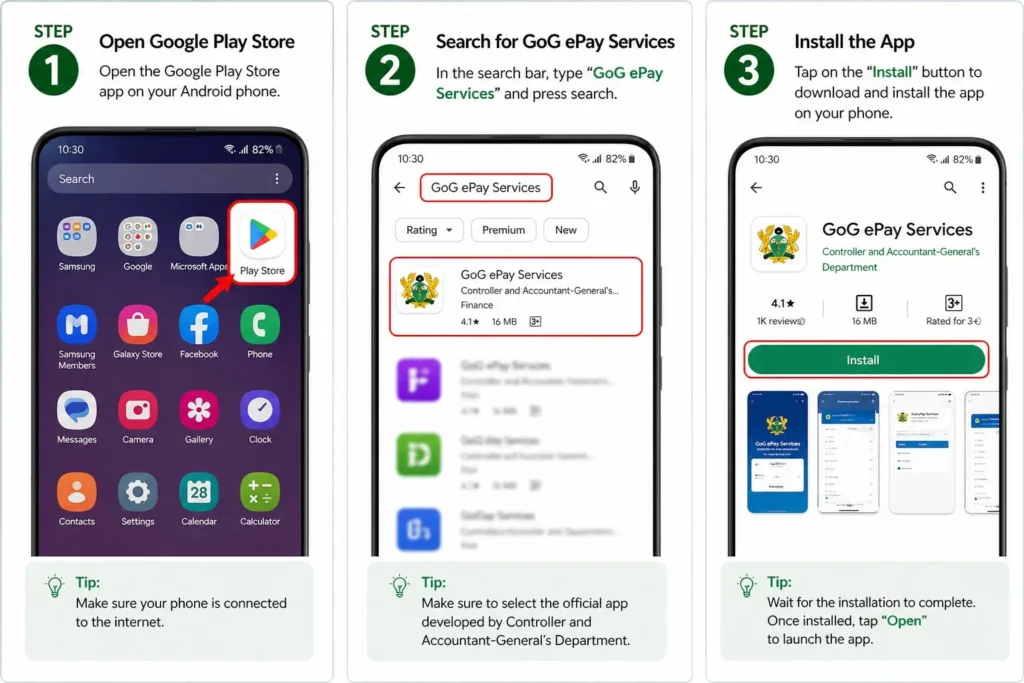
How to Install GoG ePay Services Mobile App (Step-by-Step)
If you are using the GoG ePay Services app for the first time, you need to register before you can log in. The process is similar to registering on the web portal — you will need your Employee Number, Ghana Card, and an active mobile number. If you have not yet registered on the main portal either, our GoGPayslip Registration Guide covers the full process in detail.
Step 1: Open Google Play Store
Open the Google Play Store on your Android phone or tablet.
This is where you can find and download the official GoG ePay Services app.
Step 2: Search for GoG ePay Services
In the search bar, type “GoG ePay Services” or “CAGD ePayslip” and press search.
⚠️ Make sure you choose the correct app to avoid fake or duplicate apps.
Step 3: Install the App
Tap the “Install” button to download the app on your device.
You can now log in and access your payslip anytime from your mobile device.
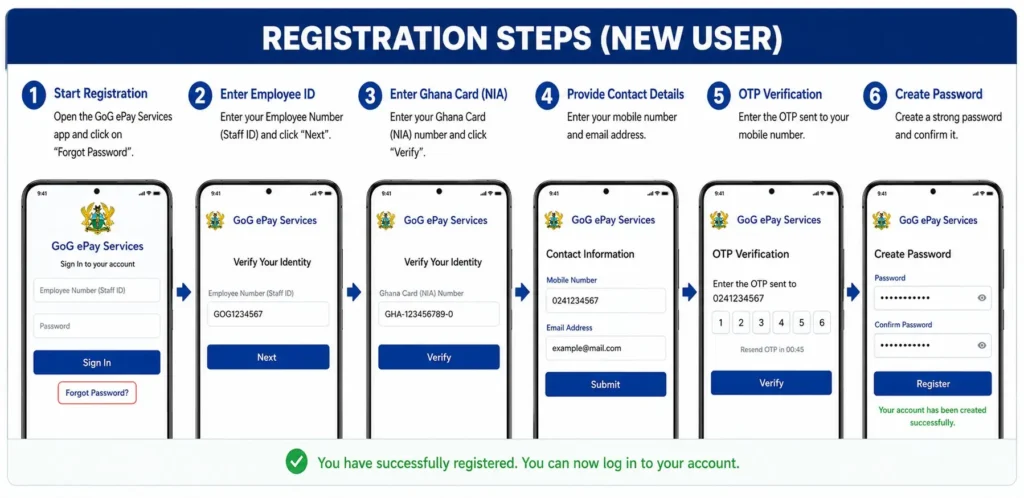
GoG ePay Services Mobile App Registration Steps
Follow these simple steps to complete your registration on the GoG ePay Services mobile app and access your payslip on your phone.
Step 1: Open the Mobile App
Open the GoG ePay Services mobile app on your Android device. On the login screen, tap on “Forgot Password” to start the registration process.
Step 2: Enter Employee Number
Enter your Employee Number (Staff ID) in the app and tap “Next” to continue.
Step 3: Enter Ghana Card (NIA)
Type your Ghana Card number in the app and tap “Verify.” Your details will be matched with official payroll records.
Step 4: Add Contact Details
Enter your mobile number and email address inside the app. Make sure your phone number is active to receive OTP.
Step 5: OTP Verification
You will receive a One-Time Password (OTP) on your mobile number. Enter the OTP in the app to verify your account.
Step 6: Create Password
Create a strong password and confirm it inside the app. Tap “Register” to complete the process.
👉 Your GoG ePay Services mobile app account is now ready. You can log in anytime to check and download your payslip directly from your phone.
Returning Users
If you have already registered on the main portal, simply open the app, enter your Employee Number and password, and tap Login. Your account details will load automatically — no separate registration needed. If you are having trouble with your login details, our GoG EPayslip Login Guide covers the most common issues.
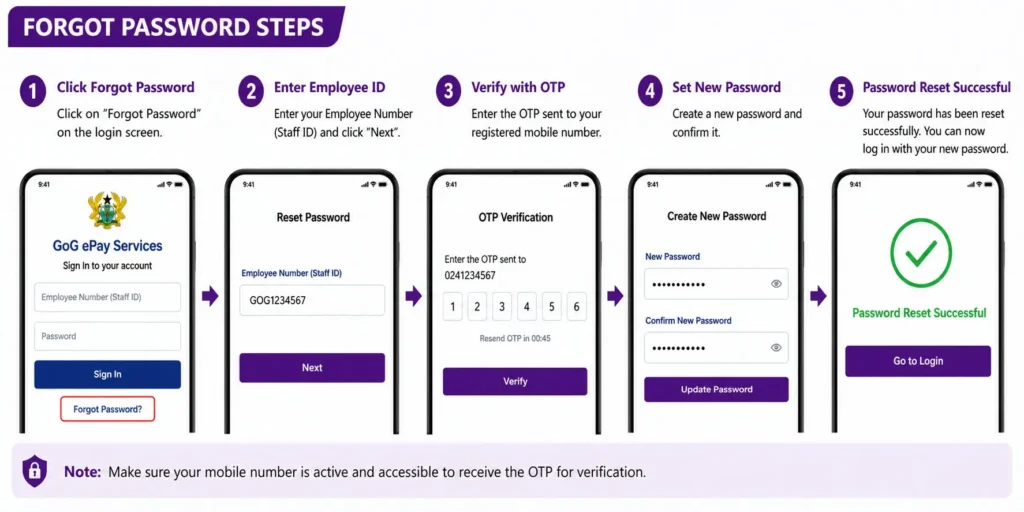
GoG ePay Services Mobile App Password Reset Guide
If you have forgotten your password, you can reset it directly through the app. The process is the same as on the web portal. For a detailed walkthrough, our Password Reset Guide covers every step. Here is how to do it through the app:
Step 1: Tap on “Forgot Password”
Open the GoG ePay Services mobile app and tap on the “Forgot Password” option on the login screen.
Step 2: Enter Your Employee Number
Enter your Employee Number (Staff ID) and proceed to the next step.
Step 3: Verify Your Identity
Provide your Ghana Card (NIA) number and confirm your details.
👉 Make sure your information matches your payroll records.
Step 4: OTP Verification
You will receive a One-Time Password (OTP) on your registered mobile number.
Step 5: Create a New Password
Create a new strong password using letters and numbers, then confirm it.
Tap “Submit” to complete the password reset process.
👉 Your password has now been updated. You can log in again using your new password.
🔒 Important Tips
👉 This ensures your GoG ePay Services account remains safe and secure.
Common GoG ePay Services Mobile App Problems and Solutions
Forgot Your Password
Tap the Forgot Password option on the app login screen, enter your Employee Number and Ghana Card number, verify with OTP, and set a new password. For a full step by step walkthrough, see our Password Reset Guide.
OTP Not Received
Check your network signal and make sure your registered SIM card is inserted and active. Wait a few minutes before requesting a new OTP — tapping Resend repeatedly can temporarily block the SMS. If the number on your payroll record has changed, you will need to update it through your HR office before OTPs will arrive correctly.
GoG ePay Services Mobile App Not Opening
If the app crashes or does not open, close it fully and try again. If the problem continues, uninstall the app, restart your phone, and reinstall it from the Play Store. Make sure your Android version meets the minimum requirement of Android 5.1 or higher.
Login Details Not Working
Double check your Employee Number and password — passwords are case sensitive. If you recently reset your password on gogepayservices.com, make sure you are using the updated one. If your Employee Number is not being recognised, our Employee Number Not Found guide covers the most common causes and fixes.
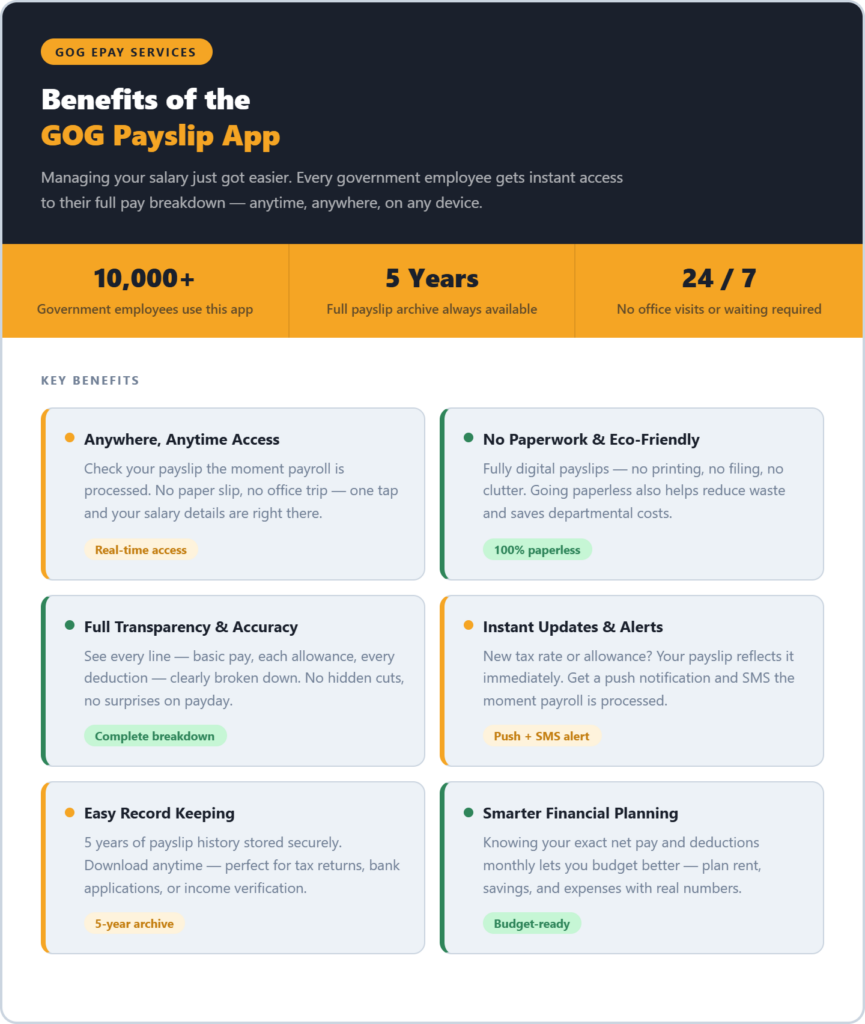
Benefits of GoG ePay Services Mobile App
Anywhere, Anytime Access
No more waiting for a paper slip or making a trip to the payroll office. Your full salary breakdown is on your phone whenever you need it — at home, at work, or anywhere in Ghana with an internet connection.
No Paperwork
Everything is digital. Your payslip is never printed, which means less paper and a cleaner, more organised system. You can download a PDF copy whenever you need one for bank applications or official use.
Full Transparency
The app shows your complete salary breakdown — basic pay, allowances, and every deduction — clearly and in full. Nothing is hidden or vague. If something looks wrong, you can flag it immediately through the Wrongful Deductions feature on the portal.
Instant Updates
Your payslip appears in the app the moment payroll is processed each month. No delays, no waiting for someone to print and distribute it.
Easy Record Keeping
All your previous payslips are stored in your account. You can access any month’s payslip at any time — useful for loan applications, tax filing, or keeping track of salary changes over time. Our GRA Tax Report guide explains how to access your full tax history from the same account.
Smarter Financial Planning
Seeing your exact net pay, allowances, and deductions every month makes budgeting much easier. You know exactly what you earn and what is being taken — which helps you plan loan repayments and monthly expenses with real numbers rather than guesses.
CAGD EPayslip App Information
The CAGD EPayslip app is developed by Ghana’s Controller & Accountant General’s Department — giving every government employee direct, secure access to their salary details.
CAGD EPayslip App
Official Government of Ghana Payroll App
| Developer | Controller & Accountant General’s Department (CAGD) |
| App Name | CAGD EPayslip |
| Platform | Android 5.1 or higher |
| Latest Version | 1.21 (2023) |
| App Size | 15 MB — lightweight & fast |
| Downloads | Over 10,000 on Google Play |
| Price | Free |
10K+Downloads
FreeNo cost ever
15 MBLightweight
Android5.1 or higher
Official Government App
Built and maintained directly by Ghana’s CAGD — your data is secure and always up to date with official payroll records.
Trusted & Secure
Over 10,000 government employees actively use this app. Your salary data is protected under Ghana’s official payroll infrastructure.
Always Up to Date
Your payslip appears in the app the moment payroll is processed each month — no delays, no waiting for a paper copy.
Ready to take control of your salary?
Free to download on Google Play — works on any Android 5.1+ device.
Pros and Cons of the CAGD EPayslip App
If you are a Ghana government employee considering the GoG ePay Services mobile app, here is an honest look at what it does well and where it falls short.
Pros
It is official and trustworthy. The app is built by Ghana’s Controller and Accountant General’s Department. That means your salary data comes directly from the government payroll system — not a third-party tool. You can trust what you see.
It costs nothing to use. The app is completely free to download and use. There are no monthly charges, no premium plans, and no hidden fees. Every government employee gets full access at zero cost.
You can check your payslip anytime. No more waiting for a paper slip or visiting your office. Open the app on your phone and your full salary breakdown — basic pay, allowances, deductions, and net pay — is right there, any time of day.
It removes the need for paper. Everything is digital. Your payslip is never printed, which means less paper waste and a cleaner, more organised system for everyone.
You always see accurate, up-to-date figures. The moment payroll is processed, your payslip is updated. Any changes to your tax, allowances, or deductions show up immediately — no delays, no guessing.
Cons
iPhone users cannot use it. The app is only available on Android. If you use an iPhone or iPad, there is currently no official version for you on the App Store.
First-time setup takes a bit of effort. When you use the app for the first time, you need a registration code to create your account. Some users find this step confusing, especially if they are not sure where to get the code from.
You need to remember your login details. Every time you open the app, you need your employee number and password. There is no fingerprint or face login option, which some people find inconvenient.
It does not work without internet. You need an active data or Wi-Fi connection to view your payslip. In areas with poor network coverage, this can be a problem.
The CAGD EPayslip app is a reliable and useful tool for any Ghana government employee. It is free, official, and gives you full control over your salary information. The limitations are minor and mostly manageable. If you use an Android phone, there is no good reason not to have it installed.
Conclusion
The GoG ePay Services mobile app puts your complete salary breakdown — basic pay, allowances, and every deduction — directly on your phone. It is free, officially built by Ghana’s Controller and Accountant General’s Department, and available to every government employee on the CAGD payroll.
To get started, collect your registration code from your HR or payroll department, download the app from Google Play, and complete the one-time setup. After that, your payslip is available anytime you need it — no office visits, no paperwork, no waiting.
For related guides, see our GoG EPayslip Login Guide, Password Reset Guide, and the GoG ePay Services Features Guide for a full overview of everything the portal offers.
This website shares independent information about the GoG EPayslip system to help Ghana government employees. It is not officially connected to the Government of Ghana or CAGD.
FAQs
Is the GoG ePay Services mobile app free?
Yes. The app is completely free to download and use. There are no subscription fees or hidden charges. You only need an active internet connection to access your payslip and other account features.
Is the app available for iPhone?
Currently the app is only available on Android devices through the Google Play Store. iPhone users can still access all the same features through the mobile browser at www.gogpayslip.com — the web portal works on any smartphone.
Do I need to register again if I already use the web portal?
No. If you are already registered on gogepayservices.com, you can log in to the app using the same Employee Number and password. No separate registration is needed.
What should I do if the app is not available in my country or region?
Try searching for “CAGD EPayslip” on the Play Store. If the app still does not appear, use the official web portal at www.gogepayservices.com through your mobile browser — it works on all devices and has the same features.
What is the minimum Android version required?
The app requires Android 5.1 or higher. If your phone runs an older version, you may need to update your operating system or use the web portal instead.