GOG EPayslip Portal 2026 – Login & Download Your Payslip Instantly
GoG ePayslip is the online payroll system Ghana government employees use to download monthly payslips, check salary deductions and manage their account. This guide shows you how to log in, register and use the portal step by step.
The portal is designed to let employees manage account and salary tasks without visiting their HR office in person. This guide walks you through the main steps for each task.
This website is an independent informational guide for Ghana government employees. We are not affiliated with, endorsed by, or operated by the Controller and Accountant-General’s Department (CAGD) or the Government of Ghana. For official login and account access, always use the official portal directly.
How to Register on GoG ePayslip
Registration requirements may vary. The portal may ask for details such as your employee number, registration code, mobile number and email address. Follow the instructions displayed on the official registration page.
For the full walkthrough with screenshots of every screen, see our GoG EPayslip Registration Guide. (link: https://gogpayslip-gh.com/gogpayslip-registration-guide-2026/)
How to Log In
Visit gogpayslip.com, enter the login details requested by the official portal, complete the captcha if shown, and click Login.
If your details are not accepted, see our GoG EPayslip Login Guide for the specific error messages and how to fix each one. (link: https://gogpayslip-gh.com/gog-epayslip-login/)
How to Update Your Phone Number
If this option is available in your account, follow the instructions shown on the official portal to enter and verify a new phone number.
How to Download Your Payslip
After logging in, open the payslip section available in your dashboard. Select the month or year, if those filters are available, and use the download or generate option shown.
GoG ePayslip Calculators and Salary Tools
These tools give an estimate based on the numbers you enter. They are not official payroll calculations and may not match the exact figures on your payslip.
Net Salary Calculator
Net Salary Calculator
This is an estimate only and may not match the exact figure on your official payslip.
Loan Affordability Calculator
Loan Affordability Calculator
This is a rough estimate based on the numbers you enter. Actual loan eligibility depends on the lender's own criteria.
For a full breakdown of how this estimate works, see our GoG EPayslip Loan Affordability Guide. (link: https://gogpayslip-gh.com/gog-epayslip-loan-affordability/)
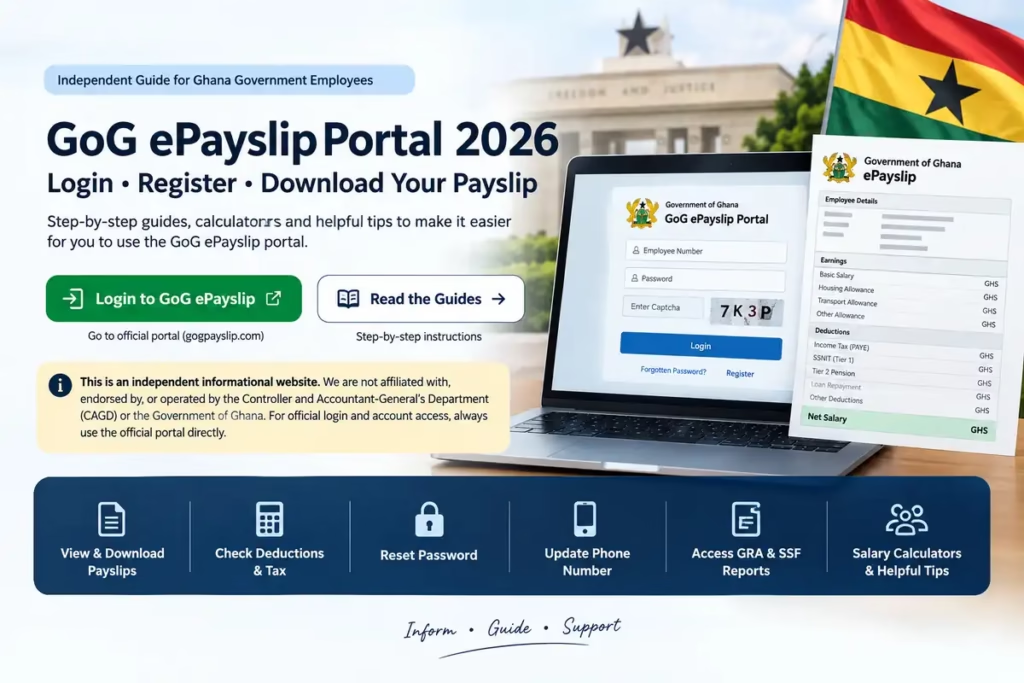
Sections of a GoG ePayslip Portal Explained
1. Header Information The header may show details such as your name, employee number, pay period, department, grade and other employment information, depending on your account. Check these details regularly and report any error through the portal.
2. Earnings Section This section shows every payment you received that month including Basic Salary, Housing Allowance, Transport Allowance, Utility Allowance, Responsibility Allowance, Professional Allowance, and Rent Allowance. Not every employee receives every allowance listed here. This depends on your grade, department and employment terms.
3. Deductions Section The most important section every Ghana government employee should check carefully. Deductions may include Income Tax (PAYE) by GRA, Tier 2 Pension, SSNIT Tier 1, Third-Party Deductions, Union Dues, and Loan Repayments. If your account includes a Wrongful Deductions option, you may use it to report an incorrect or unauthorized deduction. Otherwise, contact your payroll office or the official support channel. Our detailed GoG EPayslip Wrongful Deductions guide covers this in more detail. (link "Wrongful Deductions guide": https://gogpayslip-gh.com/gog-epayslip-wrongful-deductions/)
4. Net Salary Net Salary is generally the amount remaining after applicable deductions. Compare the displayed amount with your bank credit, keeping in mind that payment timing or adjustments may cause differences.
5. GRA Tax Report Your GoG ePayslip may show your monthly Ghana Revenue Authority (GRA) income tax deduction. If a GRA Report option is available in your account, you can use it to view your annual tax history. See our GoG EPayslip GRA Tax Report guide for more on this. (link "GRA Tax Report guide": https://gogpayslip-gh.com/gog-epayslip-gra-tax-report/)
6. SSNIT Contributions Your monthly Social Security and National Insurance Trust (SSNIT) contribution may be shown on your GoG ePayslip. If an SSF Report option is available in your account, you can use it to check your contribution history.
7. Tier 2 Pension Your GoG ePayslip may separately show your monthly Tier 2 occupational pension contribution. If a Tier 2 Deductions option is available in your account, you can use it to track this over time.
Common Mistakes Ghana Government Employees Make When Reading Their Payslip
One common mistake is checking only the net salary figure and ignoring the rest of the payslip.
A few patterns worth watching for:
Not verifying that every allowance you are entitled to actually appears on the payslip. Travel, housing, or responsibility allowances occasionally get missed in payroll updates.
Report unexpected deductions promptly so the relevant office can review them.
Review your SSNIT and Tier 2 pension entries regularly. If something looks incorrect, ask your payroll office for clarification.
Delaying a report about an unexpected deduction instead of asking the payroll office for clarification.
Not downloading and saving payslips regularly, which becomes a real problem the one time you need several months of records for a loan or other financial application.
And the one that should not need saying, never log in using someone else's employee number and password, even to help a colleague. It puts both accounts at risk.
How to Reset Your Password
Follow the password reset instructions shown on the official portal, starting with the Forgotten Password option on the login page. Depending on the account process, you may receive a verification code or further instructions.
Full details are in our GoG EPayslip Password Reset Guide. (link: https://gogpayslip-gh.com/gog-epayslip-password-reset/)
Helpful GoG EPayslip Guides for Ghana Government Employees
Find step-by-step GoG EPayslip guides for salary deductions, GRA tax reports, SSNIT contributions, password reset, payroll issues and more.
Popular GoG EPayslip Guides
GoG EPayslip Wrongful Deductions Guide — what to do when a deduction on your payslip does not look right. (https://gogpayslip-gh.com/gog-epayslip-wrongful-deductions/)
GoG EPayslip GRA Tax Report Guide — reading and downloading your annual tax history. (https://gogpayslip-gh.com/gog-epayslip-gra-tax-report/)
GoG EPayslip for Ghana Government Employees — a general overview of who the portal serves and how. (https://gogpayslip-gh.com/gog-epayslip-for-ghana-government-employees/)
GoG EPayslip Login Guide — fixing common login problems step by step. (https://gogpayslip-gh.com/gog-epayslip-login/)
GoG EPayslip Loan Affordability Guide — how the affordability calculator works and what banks look for. (https://gogpayslip-gh.com/gog-epayslip-loan-affordability/)
GoG EPayslip Registration Guide — the complete sign-up walkthrough with screenshots. (https://gogpayslip-gh.com/gogpayslip-registration-guide-2026/)
GoG Epay Services Registration — an overview of the registration requirements and how the system works. (https://gogpayslip-gh.com/gog-epay-services-registration/)
GoG EPayslip Password Reset Guide — recovering account access when you are locked out. (https://gogpayslip-gh.com/gog-epayslip-password-reset/)
GoG Epay Services Mobile App Guide — installing and using the Android app. (https://gogpayslip-gh.com/gog-epay-services-mobile-app/)
Ghana Salary System 2026 — how government pay grades and salary structures work. (https://gogpayslip-gh.com/ghana-salary-system-2026/)
Changing Your Teacher Union on GoG ePayslip — for GES staff updating union affiliation. (https://gogpayslip-gh.com/change-teacher-union-on-gog-epayslip/)
Employee Number Not Found Error — troubleshooting this specific registration error. (https://gogpayslip-gh.com/gog-epayslip-employee-number-not-found-error/)
GoG ePayslip Mandate Form Guide — generating and submitting mandate forms correctly. (https://gogpayslip-gh.com/gogpayslip-mandate-form-guide-2026/)
GoG Epay Services Features — a full breakdown of everything the portal offers, from payslip downloads to deduction tracking. (https://gogpayslip-gh.com/gog-epay-services-features/)
Why the GoG ePayslip Portal Actually Matters
For most government employees, a payslip is not something you think about until you need it. Applying for a loan, filing taxes, or proving income for an insurance application all come up eventually. Having it available online, rather than chasing a paper copy from HR, makes those moments considerably less stressful.
A few ways this plays out in practice:
Proof of income. Banks, landlords, and insurance providers regularly ask for a recent payslip. Downloading one online can save you a trip to HR for a physical copy.
Tax filing. Payslips can help you review your annual earnings and tax deductions.
Loan applications. Banks want to see your deductions alongside your gross salary to judge what you can realistically repay. Your ePayslip has both, clearly laid out.
Budget planning. Reviewing a few months side by side makes it easier to spot patterns in spending and plan around your actual take-home pay.
Key Features of GoG ePayslip Portal
Depending on your account, the portal may include:
Payslip & Salary Services
Depending on your account, available services may include My Payslips, My Supplementary Payslip and My Affordability.
Reports & Deductions
My GRA Report, My S.S.F Report, Tier 2 Deductions, Third Party Deductions, Wrongful Deductions
Account & Employee Services
Change Password, Change of Association Form, My Ghana Card, Messages, Survey
Forms & Requests
Generate Mandate Forms, if available. See our Mandate Form guide for what these are and when you need one. (link: https://gogpayslip-gh.com/gogpayslip-mandate-form-guide-2026/)
Portal Helpdesk
For account support, use the contact details displayed on the official GoG ePayslip portal.
FAQs
What is GoG ePay Services? GoG ePay Services is the online payroll platform used by government departments in Ghana to manage employee payslips, deductions and related payroll records. Employees log in to gogpayslip.com to view payslips and manage basic account details.
Are my payslip records stored online? Past payslips are generally available through the portal. Select the relevant month and year to view or download an older one, if those options appear in your account.
Is GoG ePayslip secure to use? Follow the verification steps shown on the official portal when logging in or making changes to your account. Never share your password or any verification code with anyone.
Can I use my payslip for loan applications? A downloaded payslip is commonly accepted as proof of income, though requirements vary by bank or lender. Check with the institution before applying.
Does GoG ePayslip keep backup records? For questions about record storage and retention, contact the official portal support channel or your payroll office.
How can I reset GoG ePayslip Portal password? Follow the password reset instructions shown on the official portal, starting with the Forgotten Password option on the login page. See our Password Reset Guide for more detail. (link: https://gogpayslip-gh.com/gog-epayslip-password-reset/)
Can I update my phone number on GoG ePayslip portal? If this option is available in your account, you can update it from your account settings after logging in, following the verification steps shown on the portal.
What should I do if my GoG ePayslip Portal shows wrong deductions? If your account includes a Wrongful Deductions option, use it to report the issue. Note the exact deduction and amount, since you will likely be asked for this when it is reviewed. Otherwise, contact your payroll office directly. See our Wrongful Deductions Guide for more. (link: https://gogpayslip-gh.com/gog-epayslip-wrongful-deductions/)
Conclusion
GoG ePayslip allows eligible users to access available payslips and payroll-related information online, reducing the need for a paper copy from HR.
If you get locked out, use the Forgotten Password option on the login page. For anything else, use the support channels listed on gogpayslip.com.
About the Author
Written by S Zahid, who writes independent informational guides about online government services, payroll portals and payslip procedures. This website provides general information based on publicly available sources and is not an official government service.
Last reviewed: September 13, 2026
Sources Official GoG ePayslip Portal — gogpayslip.com Controller and Accountant-General's Department — CAGD official website (link "CAGD official website": https://www.cagd.gov.gh)