How to Login to GoG ePayslip Account and Check Payslip Online (2026 Guide)
If you are a Ghana government employee trying to log in to the GoG EPayslip portal for the first time — or running into problems with your login — this guide covers everything you need. From the basic requirements to common errors and how to fix them, you will find a straightforward answer here.
To get started, visit the GoG EPayslip portal at www.gogpayslip.com and follow the steps below.
What is GoG ePayslip Login Portal?
The GoG EPayslip portal at www.gogpayslip.com is the official online salary management system run by the Controller and Accountant-General’s Department (CAGD). It covers over 600,000 public sector employees across all 16 regions of Ghana — teachers, nurses, police officers, civil servants, and military staff all use the same platform.
Before the portal existed, checking your payslip meant a trip to the HR office or waiting for a paper slip. Now you can log in from your phone or computer from anywhere and access everything in minutes — your payslip, deduction history, tax records, and more.
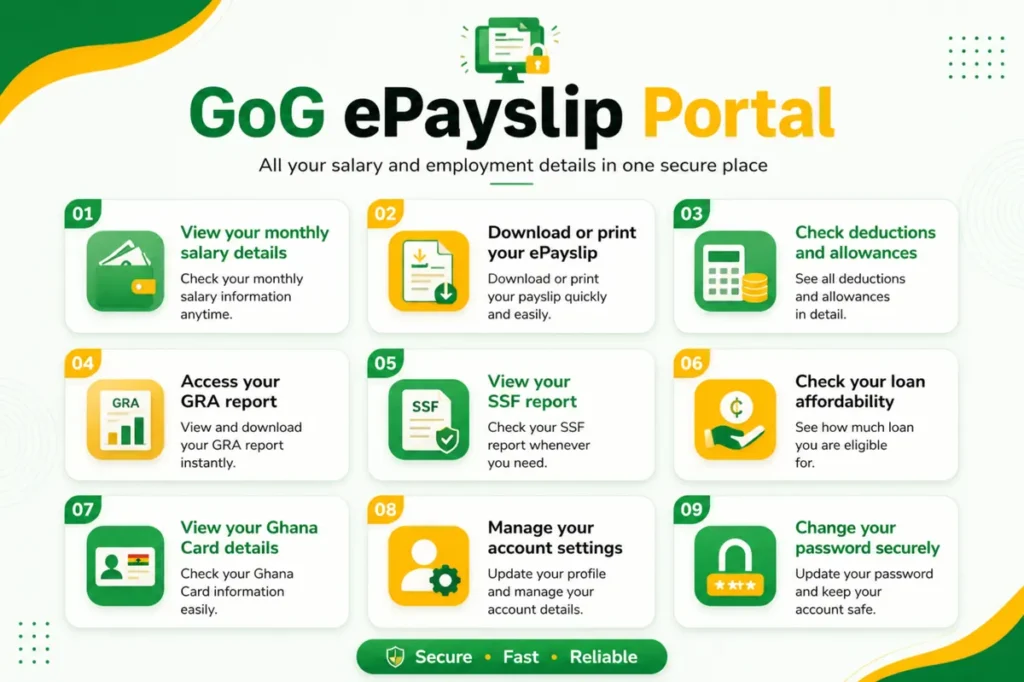
Once you are logged in to the GOGEPayslip portal, here is everything you can do:
Everything is in one secure and completely free platform — no office visits, no long queues, no paperwork at all.
Forgot your password? Read our complete GoG EPayslip Password Reset Guide for step by step instructions.
Requirements for GoG ePayslip Login
1. Registered Employee Number
Your Employee Number (also called Payroll Number) is issued by your Ghana government department, Ministry or Local Government and is the most important login requirement. Without it you simply cannot access your CAGD EPayslip account.
2. Active GOGPayslip Password
Use the password you created during GOGEPayslip registration — a strong mix of capital letters, small letters, numbers and special characters like @, #, /. Forgot it? Just click “Forgotten Password?” and reset it via OTP.
3. Registered Ghana Mobile Number
The same Ghana mobile number you used during registration is needed for OTP verification and password recovery. Keep it active and ensure it has a good network signal.
4. Captcha Code
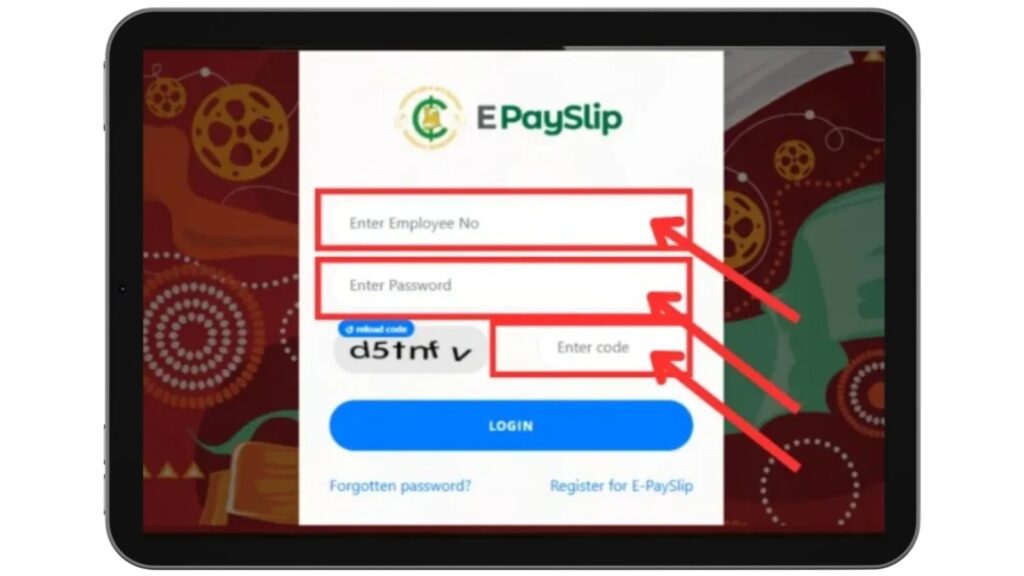
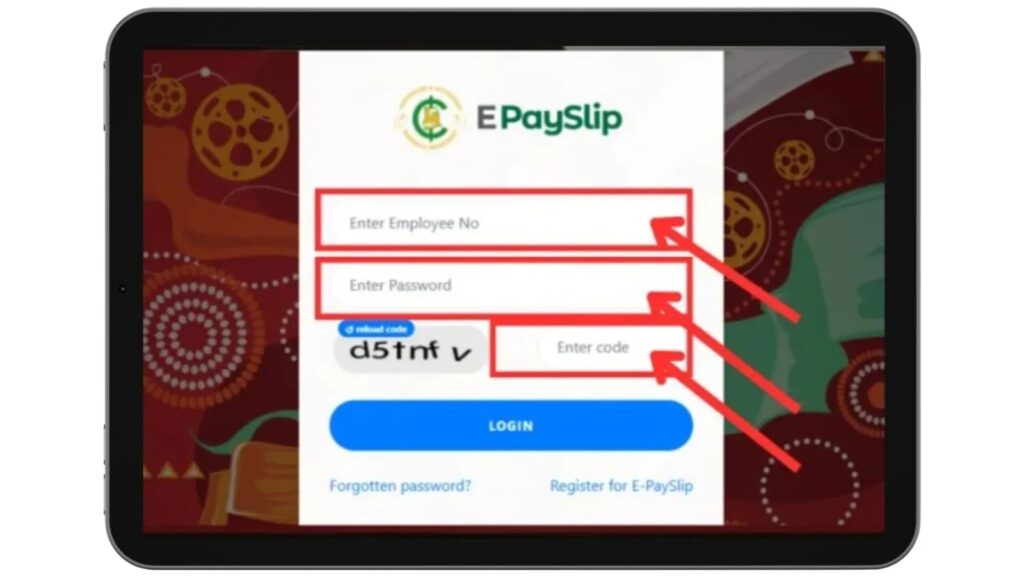
A randomly generated Captcha Code appears on the GOGPayslip login page every time. Enter it correctly before clicking Login — it protects your CAGD payroll account from unauthorized access.
5. Stable Internet Connection
Whether using mobile data, WiFi or broadband make sure your connection is stable enough to load www.gogpayslip.com without interruption.
6. Compatible Device and Browser
The GOGEPayslip portal works on any Android, iPhone, tablet, laptop or desktop. Use an updated browser like Google Chrome, Firefox, Edge or Safari for the best experience. You can also use the official GoG ePay Services mobile app from the Google Play Store.
7. Fully Activated Account
Your CAGD EPayslip account must be fully activated using the 4-digit Activation OTP sent to your phone during registration. If you skipped this step your account is not active yet and login will fail.
Use an updated browser like Chrome or Edge for better performance.
If you are not registered yet, you will not be able to log in at all. Follow our GoG EPayslip Registration Guide to set up your account first.
Step-by-Step GoG ePayslip Login Process
You can log in to your GoG ePayslip Portal account in just a few steps.
Follow this simple process:
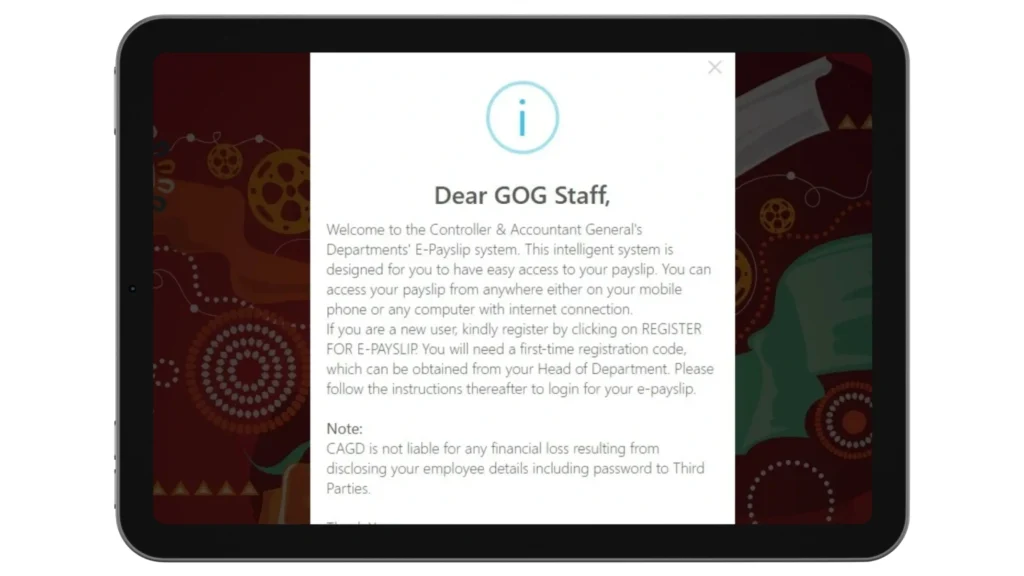
Step 1: Visit the Official Website
Go to the official website:
👉 www.gogpayslip.com
Make sure you are on the official site before entering any details — avoid links shared on WhatsApp or social media.
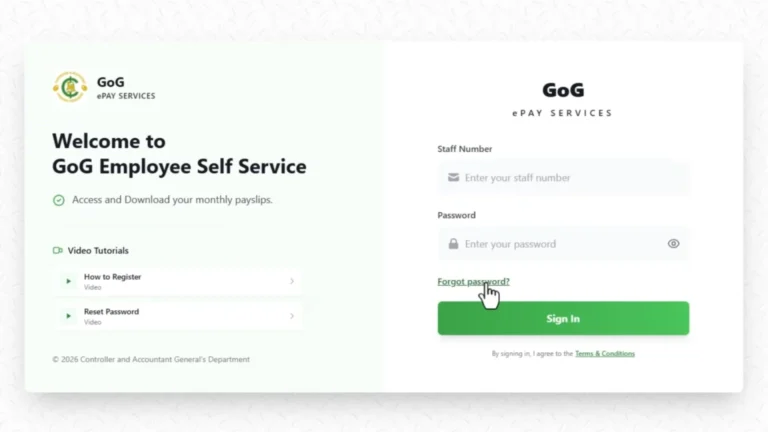
This will take you to the login page.
Step 2: Enter Your Login Details
On the login page, enter the following:
Step 3: Click “Log in”
fter entering all your details correctly, click the Login button. If everything matches, you will be taken straight to your dashboard.
Step 4: Access Your Dashboard
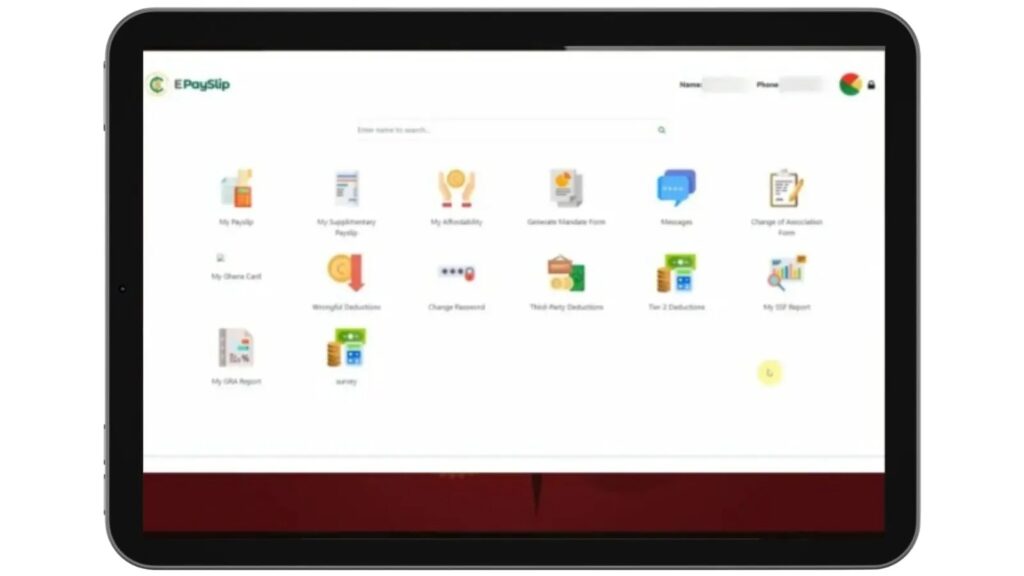
Once logged in, your dashboard gives you access to your monthly payslip, salary breakdown, deduction records, GRA tax report, SSNIT contributions, mandate forms, and loan affordability tools — all in one place.
Who Can Login to GoG EPayslip Portal?
Only active Ghana government employees currently registered on the CAGD payroll system are eligible to login to the GOGEPayslip portal, including:
Benefits of GoG ePayslip Login
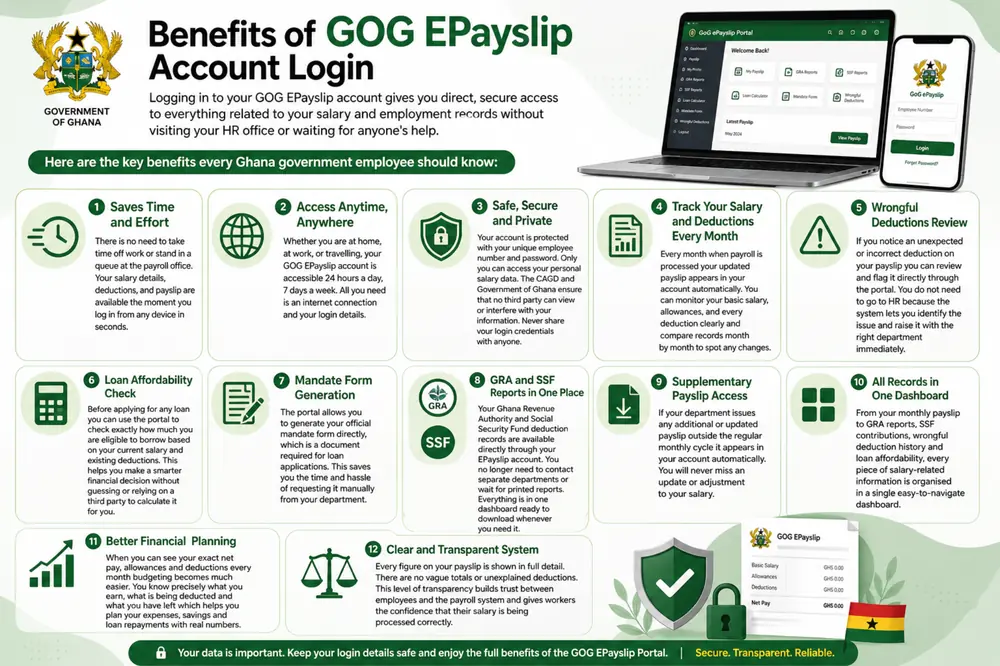
Logging in to your GOG EPayslip account gives you direct, secure access to everything related to your salary and employment records without visiting your HR office or waiting for anyone’s help.
Here are the key benefits every Ghana government employee should know:
Saves Time and Effort:
No more taking time off work or standing in a queue at the payroll office. Your salary details, deductions, and payslip are available the moment you log in — from any device, in seconds. For most employees, what used to take a half-day trip now takes two minutes.
Access Anytime, Anywhere:
Your GoG EPayslip account is available 24 hours a day, seven days a week. Whether you are at home, at work, or travelling anywhere in Ghana, all you need is an internet connection and your login details to access your full salary history.
Safe, Secure and Private:
Your account is protected by your unique Employee Number and password — only you can access your personal salary data. Never share your login credentials with anyone, including people claiming to be from CAGD. No official CAGD representative will ever ask for your password.
Track Your Salary and Deductions Every Month:
Every month when payroll is processed your updated payslip appears in your account automatically. You can monitor your basic salary, allowances, and every deduction clearly and compare records month by month to spot any changes.
Wrongful Deductions Review
This is one of the most important features on the portal and one that most employees overlook. If you notice an unexpected or incorrect deduction on your payslip, you can flag it directly through the portal without visiting HR. Our Wrongful Deductions guide explains exactly how to use this feature and what to do if the issue is not resolved quickly.
Loan Affordability Check
Before applying for any loan, you can use the portal to check exactly how much you are eligible to borrow based on your current salary and existing deductions. Our Loan Affordability guide explains how the calculator works and what the figures mean for your application.
Mandate Form Generation
The portal lets you generate your official mandate form directly — this is the document required by banks and loan companies before any salary deduction can be set up. See our GoGPayslip Mandate Form guide for a full walkthrough of how to generate and submit it.
GRA and SSF Reports in One Place
Your Ghana Revenue Authority and Social Security Fund deduction records are available directly through your EPayslip dashboard. No need to contact separate departments or wait for printed reports. See our GRA Tax Report guide for instructions on how to access, read, and download your tax history.
Supplementary Payslip Access:
If your department issues any additional or updated payslip outside the regular monthly cycle it appears in your account automatically. You will never miss an update or adjustment to your salary.
All Records in One Dashboard:
From your monthly payslip to GRA reports, SSF contributions, wrongful deduction history and loan affordability, every piece of salary-related information is organised in a single easy-to-navigate dashboard.
Better Financial Planning:
When you can see your exact net pay, allowances and deductions every month budgeting becomes much easier. You know precisely what you earn, what is being deducted and what you have left which helps you plan your expenses, savings and loan repayments with real numbers.
Clear and Transparent System:
Every figure on your payslip is shown in full detail. There are no vague totals or unexplained deductions. This level of transparency builds trust between employees and the payroll system and gives workers the confidence that their salary is being processed correctly.
Security Measures and Best Practices
Your GoG EPayslip account holds personal salary data that only you should be able to access. Follow these simple habits to keep it secure.
Regular Password Updates:
Change your password every three months using a mix of letters, numbers and special characters. Never use your name or date of birth as your password.
Secure Logout:
Always log out after every session especially on shared or public computers. Closing the browser tab alone is not enough.
Never Share Your Login Credentials:
Your employee number and password are yours only. No CAGD representative will ever ask for your password so never share it with anyone.
Avoid Public Wi-Fi:
Use your mobile data when logging in outside. Public Wi-Fi networks are not secure and your information can be accessed by others.
Do Not Save Passwords on Shared Devices:
Never let a shared device save your password. Clear your browsing history after every session.
Watch Out for Fake Websites:
Always confirm you are on the official GOG EPayslip portal before entering your details. Ignore any suspicious links or emails asking you to log in elsewhere.
Report Suspicious Activity:
If anything looks unusual in your account contact your payroll department or CAGD immediately.
Keep Your Contact Information Updated:
Keep your phone number and email address current so you never miss important alerts or password reset messages.
How to Fix Common Problems of the GOG EPayslip Portal
Here are the most common problems Ghana government employees face on the GOG EPayslip portal and how to fix them.
Forgotten Password:
Click the Reset Password link on the login page and follow the instructions. For a full walkthrough, see our Password Reset Guide.
Incorrect Employee Number:
Double-check that you are entering the correct and complete employee number. If the problem continues, our Employee Number Not Found guide covers all the known causes and fixes.
Account Lockout:
Too many failed login attempts will temporarily lock your account. Wait for the lockout period to end then try again with the correct details.
Wrong or Unexpected Deductions:
Use the Wrongful Deductions feature inside the portal to flag the issue directly, or contact your payroll department to get it investigated.
Payslip Not Loading:
Check your internet connection and refresh the page. If it still does not appear your payslip may not have been processed yet so try again after a few hours.
Unable to Download Payslip:
Make sure your browser is up to date and pop-ups are not blocked. Try a different browser or switch to mobile data.
Registration Code Not Working:
Contact your HR or payroll department. Codes are issued officially and may have expired or been entered incorrectly.
Portal Not Opening:
Check your internet connection. If your connection is fine the portal may be under maintenance so wait a short while and try again.
Session Timeout:
Your session expired due to inactivity. Simply log back in and avoid leaving your account idle for long periods.
Still Need Help:
Contact the CAGD helpdesk or your payroll department directly with your employee number ready for faster assistance.
Common GoG ePayslip Login Problems and Solutions
If you have worked through the fixes above and the problem is still not resolved, contact the CAGD helpdesk directly with your Employee Number ready — they handle these issues regularly and can usually identify the cause quickly.
FAQs
How do I access the GoG EPayslip portal?
Go to www.gogpayslip.com, enter your Employee Number, password, and the captcha code on the login page, then click Login. If your details are correct you will be taken straight to your dashboard. If you have not registered yet, you need to set up your account first — our GoG EPayslip Registration Guide walks you through it.
What should I do if I forget my GoG EPayslip password?
Click “Forgot Password” on the login page and follow the steps to reset it. If you run into any issues during the reset process, our Password Reset Guide covers every step in detail.
Why is my GoG EPayslip login not working?
The most common causes are an incorrect Employee Number, a wrong password, a mistyped captcha code, or a poor internet connection. Check each of these one by one before assuming it is a system problem. If your Employee Number is not being recognised, see our Employee Number Not Found guide for a full list of causes and fixes.
Can I download my payslip after logging in?
Yes. After logging in, go to My Payslip, select the month you need, and download or print it directly from your dashboard. Payslips for previous months are also available in the same section.
What should I do if my salary details are incorrect?
Log in and use the Wrongful Deductions feature to flag the issue directly through the portal. You can also contact your payroll department to investigate. Do not wait — the sooner you report it, the easier it is to reverse.
Can I access GoG EPayslip on my mobile phone?
Yes. The portal works on any smartphone browser without needing an app. Just open www.gogpayslip.com on your phone, log in with your details, and everything available on desktop is available on mobile too.
What is the captcha code on the login page?
The captcha is a randomly generated security code displayed on the login screen. You must type it exactly as shown before clicking Login. It changes every time the page loads and is there to prevent unauthorized access to your payroll account.
How do I check my loan affordability on GoG EPayslip?
After logging in, go to the loan affordability section on your dashboard. It calculates how much you can borrow based on your current salary and existing deductions. Our Loan Affordability guide explains how to read and use the results.
Conclusion
Logging in to the GoG EPayslip portal is straightforward once your account is registered and active. If you run into any issues, the fixes in this guide cover the most common problems Ghana government employees face.
Make it a habit to log in every month and check your full deduction breakdown — not just your net pay. If anything looks wrong, the Wrongful Deductions guide explains how to report it. For salary structure questions, our Ghana Salary System 2026 guide is a useful reference.
This website shares independent information about the GoG EPayslip system to help Ghana government employees. It is not officially connected to the Government of Ghana or CAGD.