GoG ePay Services 2026 Registration, Login and Account Access Guide
If you are a Ghana government employee trying to register on the new GoG ePay Services portal for the first time — or running into problems with OTP, login, or account access — this guide covers everything you need. It walks through the full registration process step by step, explains how OTP verification works, and gives you fixes for the most common problems employees run into along the way.
Forgot your password? See our Password Reset Guide for step by step instructions.
For a full walkthrough of the login process, see our GoG EPayslip Login Guide.
What is GoG ePay Services Registration?
GoG ePay Services, also called GoG ePayslip or gogepayservices, is the official Ghana government payslip portal managed by the Controller and Accountant-General’s Department (CAGD). It allows public sector employees to register, sign in, view payslips online, download monthly salary slips, check deductions, access GRA tax reports, review SSF contributions, and use payroll services in one place.
The portal also helps employees reset passwords, complete OTP and Ghana Card verification, access mandate forms, and request loan affordability letters. These services make it easier to manage salary-related tasks online without visiting an office.
For Login Guide Click Here
What You Can Do on GoG ePay Services
Once registered, Ghana government employees can access all of the following through one secure dashboard:
Why Did CAGD Launch the New Payslip Portal?
The new GoG ePay Services portal was introduced to improve security, identity verification, and payroll access for Ghana government employees. Here is what changed and why it matters:
1. Better Security:
The new system uses Ghana Card verification and OTP phone verification to help protect employee accounts and reduce unauthorized access.
2. Identity Verification:
Employees can verify their identity through the Ghana Card, helping improve payroll accuracy and reduce fraud.
3. Improved Portal Performance:
The new GoG ePayslip portal is designed to be more stable, support more users, and improve access to online payslip services.
4. Stronger Password Recovery:
The password reset process is more secure and helps employees recover account access more easily.
5. Paperless Payroll Services:
The portal supports digital payroll management, reducing paperwork and making payslip services easier to access online.
Required Details and Documents for GoG ePay Services Registration
Before starting the registration process, make sure you have all of the following ready. Missing any of these will stop the process partway through:
Without the required registration details, including your Ghana Card and mobile number, you may not be able to complete GoG ePay Services registration.
How to Complete GoG ePay Services Registration (Step-by-Step Guide)
Follow these steps carefully. If you have already registered on the old portal, you may still need to re-register on the new system — our GoGPayslip Registration Guide explains the differences in detail.
Step 1: Open GoG ePay Services Registration Portal
Open your browser and go to the official GoG ePay Services website: gogepayservices.com. This is the official Ghana government payslip portal for registration, login, and online payslip services.
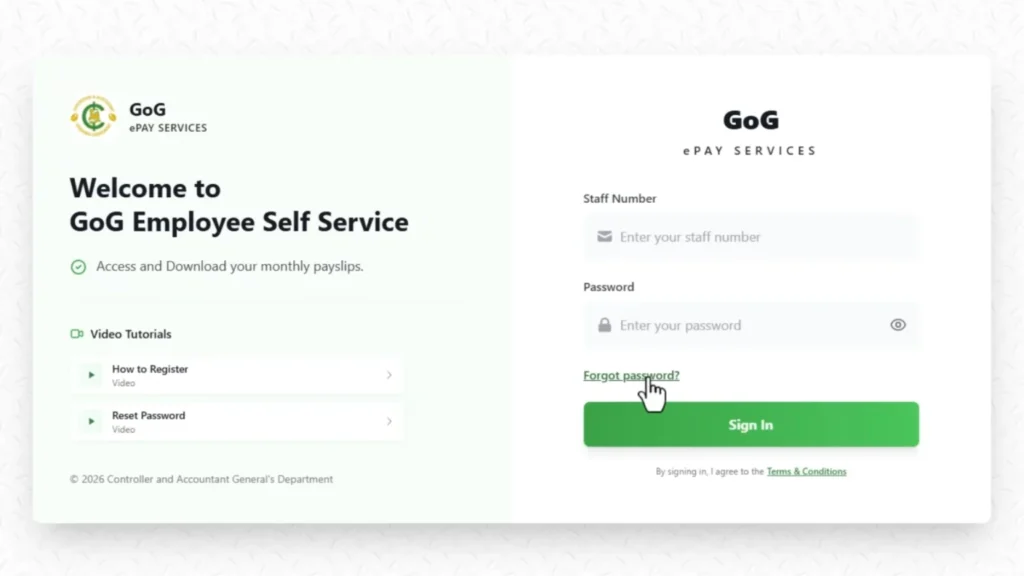
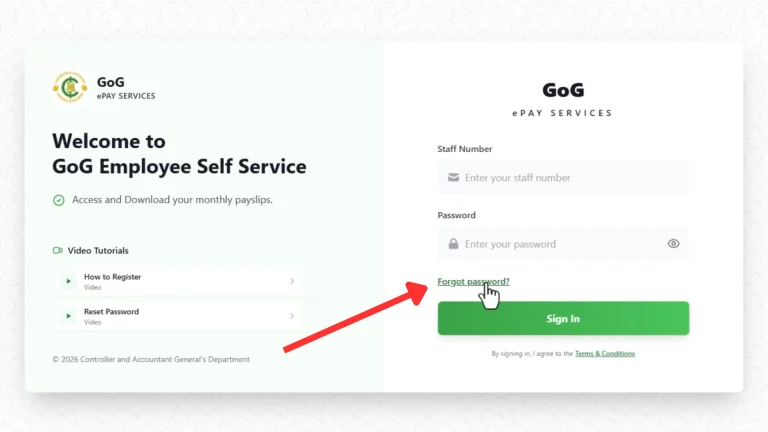
Step 2: Click on “Forgot Password”
This is where many users get confused. On the GoG ePay Services portal, the “Forgot Password” option is not only for resetting passwords — it is also used for first-time registration. Simply click on “Forgot Password” to continue with your registration process.
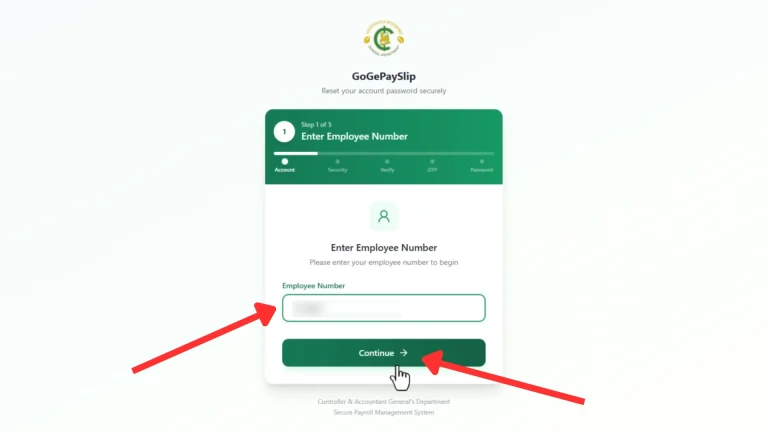
Step 3: Enter Your Employee Number
Enter your full Employee Number (Staff ID) carefully in the required field. Make sure there are no mistakes, then click the “Continue” button to proceed.
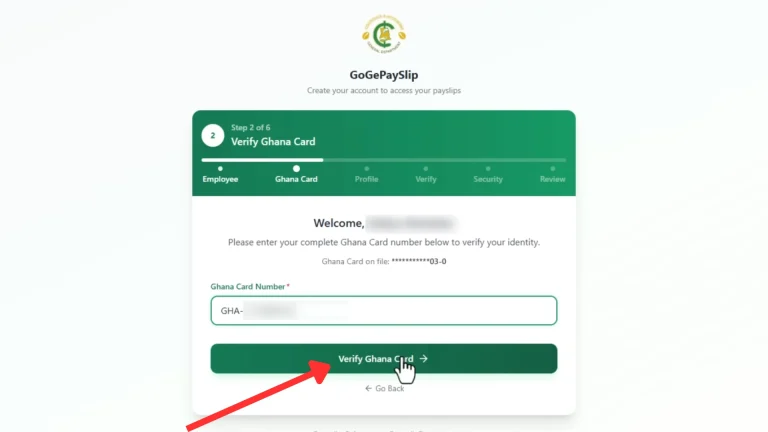
Step 4: Enter Your Ghana Card Number
Enter your Ghana Card (NIA) number carefully in the required field, then click the “Verify” button. If your details match the CAGD records, your name and department will appear automatically on the screen.
Step 5: Confirm Your Details
Check the following details carefully:
If everything is correct:
Click the “Next” button to continue.
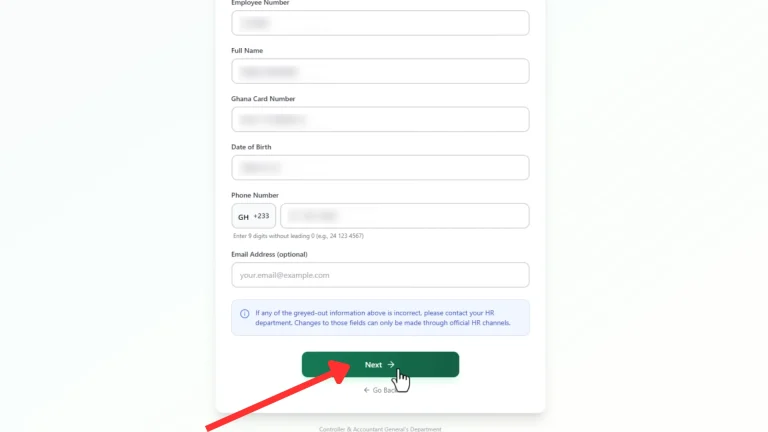
Step 6: Confirm Phone Number
Check your mobile number carefully.
Click the “Yes, Send OTP” button to continue.
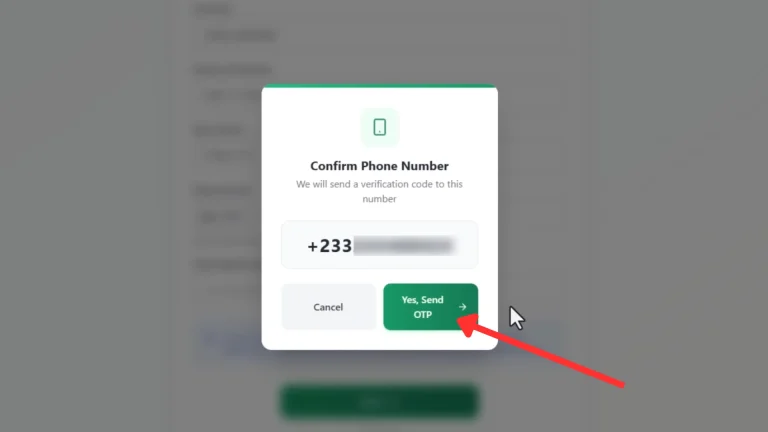
Step 7: OTP Verification (Important Step)
An OTP (One-Time Password) will be sent to your mobile number.
When you receive the code:
If you do not receive the OTP:
We will explain common OTP problems and solutions below.
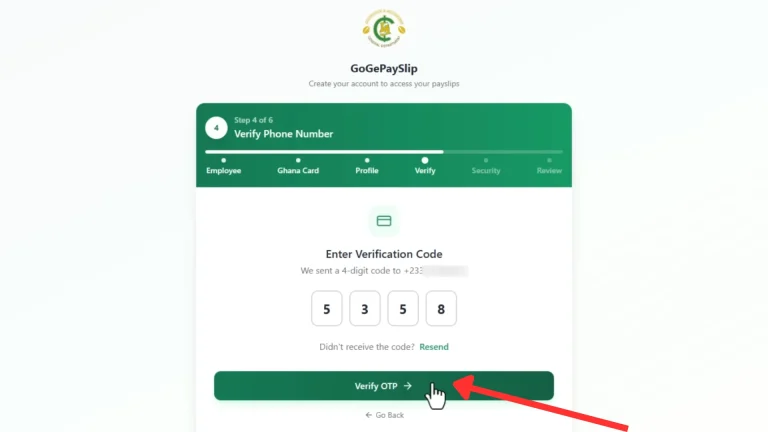
Step 8: Create Your Password
Create a strong and secure password using:
Then:
Make sure your password is easy to remember but difficult for others to guess.
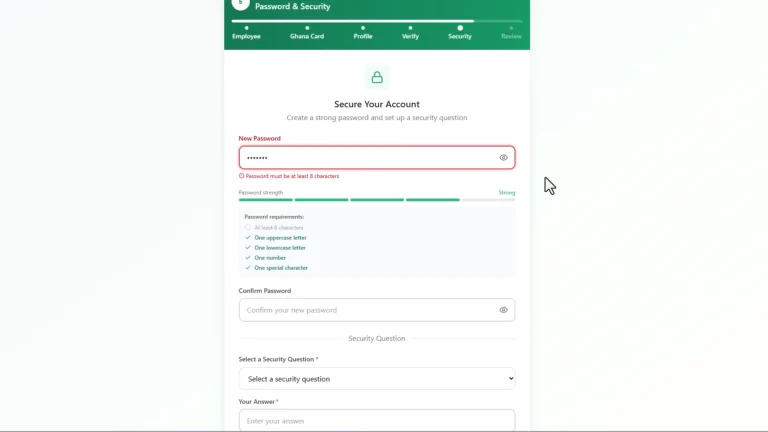
Step 9: Security Question and Answer
Choose a security question from the list.
Then click the “Register” button to complete this step.
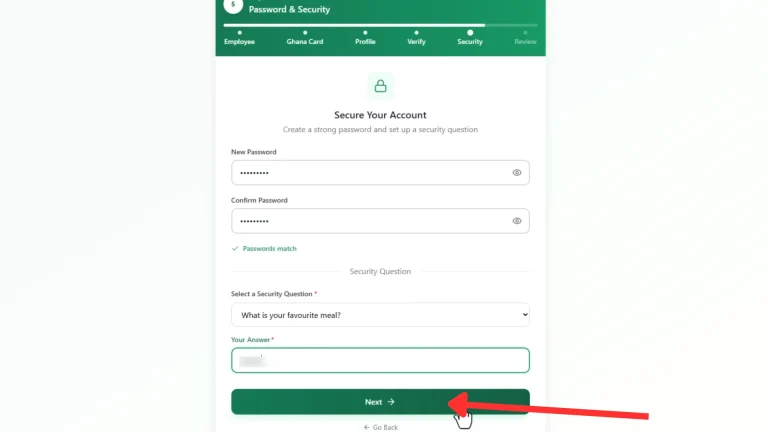
Step 10: Verify Your Information
Review all your details carefully.
If everything looks correct, click the “Register Account” button.
You have now successfully completed your GoG ePay Services registration.
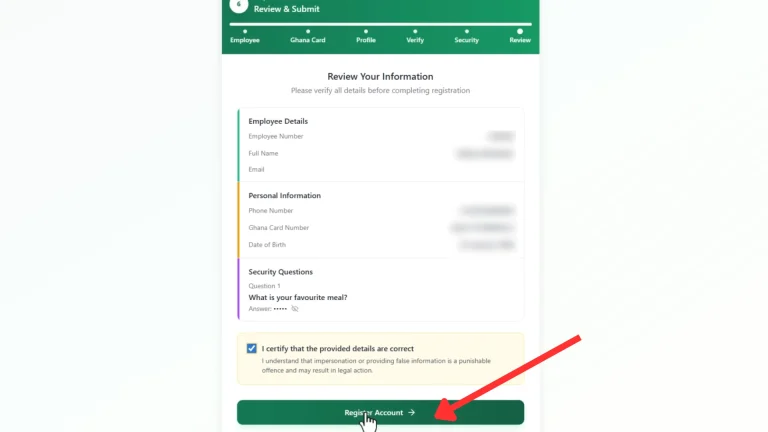
Step 11: Go to Login
A confirmation message will appear showing that your registration was successful.
You can now access your GoG ePay Services account.
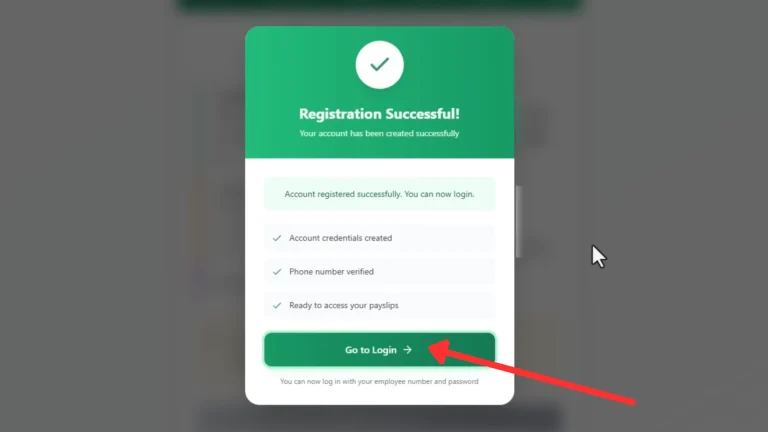
GoG ePay Services Login Process
Step 1: Open Official Portal
To access your account, first visit the official GoG ePay Services website:
Step 2: Login to Your Account
After opening the portal, follow these steps:
You will be logged into your dashboard, where you can view and download your payslip and access payroll services.
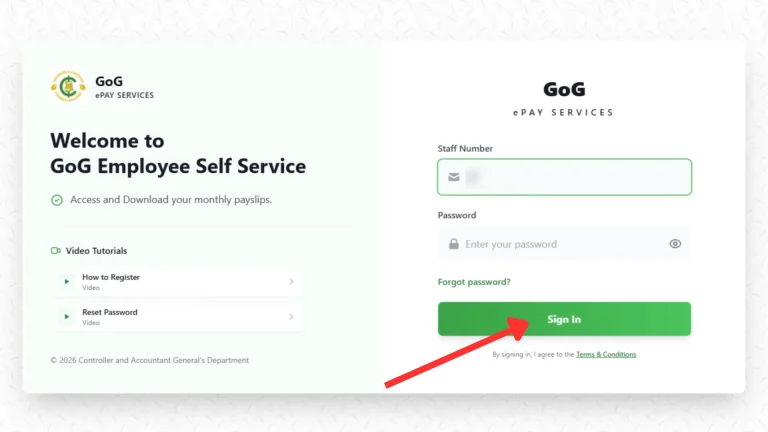
Why GoG ePay Services Registration OTP Is Not Coming
If you are not receiving your GoG ePay Services OTP, one of these common issues may be causing the problem:
1. Wrong Registered Mobile Number
If the mobile number linked to your CAGD EPayslip account is incorrect or outdated, the OTP will be sent to the wrong number.
2. Poor Network Signal
Weak mobile network coverage can delay or block OTP SMS delivery, especially in areas with poor signal.
3. Inactive SIM Card
If your registered Ghana SIM card is inactive, disconnected, or replaced, you may not receive the OTP message.
4. Full SMS Inbox
A full inbox can stop new SMS messages from arriving. Delete old messages and try again.
5. Network Delay
During busy hours, OTP delivery may take a few minutes due to network congestion.
6. Flight Mode or DND Enabled
If your phone is in Flight Mode or Do Not Disturb mode, SMS notifications may not appear.
7. Technical Issue on CAGD Portal
Sometimes the GOGEPayslip portal may experience temporary server issues that delay OTP delivery.
8. Expired OTP Code
OTP codes usually expire within a few minutes. If the code expires, click “Resend OTP” to request a new one.
9. SIM Card Problem
A loose or damaged SIM card can prevent your phone from receiving OTP messages properly.
10. Recently Changed Network
If you recently switched your number to another network provider, SMS delivery may be temporarily delayed.
How to Fix GoG ePay Services OTP Not Coming
If your GoG ePay Services OTP is not arriving, try these simple fixes step by step:
1. Check Your Registered Mobile Number
Make sure the mobile number linked to your CAGD EPayslip account is correct and active. If the number is outdated, contact your department validator or nearest CAGD office.
2. Check Network Signal
Ensure your phone has a strong mobile signal before requesting a new OTP. Weak network coverage can delay SMS delivery.
3. Click “Resend OTP”
Use the “Resend OTP” option on the login page and wait at least 60 seconds before trying again.
4. Clear Your SMS Inbox
Delete old text messages to free up storage space for new OTP messages.
5. Turn Off Flight Mode or DND
Disable Flight Mode and Do Not Disturb mode so your phone can receive SMS notifications properly.
6. Restart Your Phone
Restarting your phone can refresh network settings and fix temporary SMS issues.
7. Reinsert Your SIM Card
Remove your SIM card, insert it properly again, and request a new OTP.
8. Wait a Few Minutes
Sometimes OTP delivery is delayed due to high traffic on the GOGEPayslip portal or mobile network congestion.
9. Try Another Network or WiFi
If your network is unstable, switch to another mobile network or use WiFi if available.
10. Contact CAGD Support
If the OTP is still not coming, contact your department validator or visit the nearest CAGD Ghana office for assistance.
Still Not Receiving OTP?
If none of these solutions work, contact official CAGD support for help with your GoG ePay Services account.
0242162781
0552925395
0245289771
0505660003
0243340355
Common GoG ePay Services Registration Problems
Apart from OTP issues, users may face other common problems while using the GoG ePay Services portal. Here are the most frequent issues and their solutions:
1. Ghana Card Not Recognized
If your Ghana Card is not accepted, it is usually due to an incorrect number or format.
👉 Solution:
2. Account Locked
Your account may be temporarily locked after several incorrect login attempts.
👉 Solution:
3. Old Portal Not Working
The old GoG payslip website is no longer active.
👉 Solution:
4. OTP Expired or Invalid
The OTP may expire if it is not entered on time.
👉 Solution:
5. Incorrect Staff ID or Details
Entering the wrong Staff ID or personal details can stop you from logging in or registering. Our Employee Number Not Found guide covers all the known causes and fixes in detail.
6. Password Reset Not Working
Password Reset Not Working
Some users face issues while trying to reset their password. Our Password Reset Guide walks through every step of the process and covers the most common errors that come up during recovery.
7. Portal Not Opening or Loading Slowly
The website may be slow or not load properly during busy hours.
👉 Solution:
Old vs New GoG ePay Services Portal – Complete Comparison
| Feature | Old GoGPayslip | New GoG ePay Services |
|---|---|---|
| Website | gogpayslip.com | gogepayservices.com |
| Security | Basic | Ghana Card + OTP Verification |
| Registration | Registration Code | Ghana Card Verification |
| Login Method | Simple login | OTP-secured login |
| Password Reset | Basic | OTP-based secure reset |
| OTP Verification | Not available | Required for login & verification |
| Performance | Slow during peak times | Improved and more stable |
| Mobile Friendly | Limited | Fully mobile-friendly |
| Error Handling | Limited support | Better error handling system |
| Account Recovery | Basic | Secure recovery with OTP |
| Features | Limited | Payslips, reports, payroll services |
| Interface | Older design | Modern and improved system |
Important Tips for GoG ePay Services Users
These tips can help you complete GoG ePay Services Registration safely and avoid account problems.
Conclusion
GoG ePay Services registration is a one-time process — once your account is active, you only need your Employee Number and password to log in each time. The new system is more secure than the old portal, and most of the features that used to require an office visit can now be handled entirely online.
If you run into any issues after registering, our guides cover the most common ones: GoG EPayslip Login Guide, Password Reset Guide, Employee Number Not Found, and Wrongful Deductions.
This website shares independent information about the GoG EPayslip system to help Ghana government employees. It is not officially connected to the Government of Ghana or CAGD.
FAQs
How do I complete GoG ePay Services registration?
Go to gogepayservices.com, click “Forgot Password” on the login page — this is also how first-time registration begins — and follow the steps using your Employee Number, Ghana Card, and registered mobile number. Our GoGPayslip Registration Guide has the full step by step walkthrough.
Why is my GoG ePay Services OTP not arriving?
The most common reasons are a weak network signal, an incorrect or outdated mobile number on your payroll record, or a full SMS inbox. Wait a few minutes, check your signal, clear your inbox, and request a new OTP. If the number linked to your CAGD account has changed, you will need to update it through your HR office before OTPs will arrive.
How do I log in to my GoG ePay Services account?
Go to gogepayservices.com, enter your Staff ID and password, and click Sign In. For a full walkthrough and solutions to common login errors, see our GoG EPayslip Login Guide.
How do I reset my GoG ePay Services password?
Click Forgot Password on the login page, verify your identity using OTP, and create a new password. Our Password Reset Guide covers every step and the most common issues that come up during recovery.
What should I do if my account is locked?
Wait at least 30 minutes before trying again — repeated failed attempts extend the lockout period. Use your correct Staff ID and password when you try again. If you are unsure of your password, use the Forgot Password option to reset it rather than guessing.
Is the old GoG payslip portal still working?
No. The old portal at gogpayslip.com has been replaced by the new GoG ePay Services portal at gogepayservices.com. All registration, login, and payslip services now go through the new system.
What do I need to register on GoG ePay Services?
You need your Employee Number, Ghana Card (NIA number), Registration Code from your payroll validator, an active Ghana mobile number, and an email address. Missing any of these will stop the registration process.
How do I download my payslip after registering?
After logging in, go to My Payslip on your dashboard, select the month you need, and download or print it. Previous months are also available in the same section.
Can I use GoG ePay Services outside Ghana?
Yes, you can access the portal from anywhere with an internet connection. However, your registered Ghana mobile number must be active to receive OTP codes — international numbers are not accepted for OTP verification.
Why is my Ghana Card not being accepted during registration?
This usually means the number was entered incorrectly or your Ghana Card is not yet linked to your CAGD payroll record. Check the number carefully and confirm with your HR office that your card details are on file with CAGD.