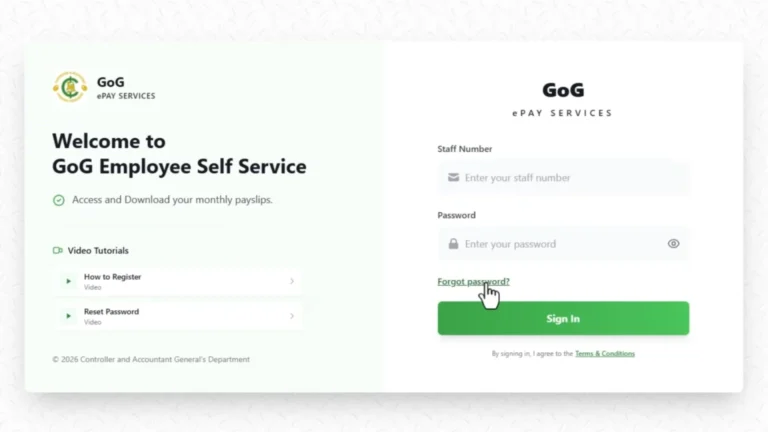
GoG ePayslip Employee Number Not Found Error – Easy Fix Guide
If you are trying to log in or register on the GoG EPayslip portal and you keep seeing an “Employee Number Not Found” error, you are not alone. This is one of the most common issues Ghana government employees run into, and in most cases it has nothing to do with your employment status. The problem is usually a simple data mismatch or an account that has not been fully activated yet — both of which can be sorted without visiting your HR office or calling CAGD. This guide walks you through every known cause and the exact steps to fix it.
What Does the Employee Number Not Found Error Mean on GoG EPayslip?
When the GoG EPayslip portal shows this error, it means the CAGD payroll system could not match the employee number you entered against its database. That does not mean your employment record has been deleted or that anything serious has happened. In most cases, your record is still active — the system just cannot find it based on what was entered. The most common causes are a typo in the number, a payroll record that has not been activated yet, or an account that needs to be registered before it can be used. If you are also having trouble with the login page itself, our GoG EPayslip Login Guide covers that separately.
You may also see related messages such as:
These messages all point to the same issue: the system is unable to verify your payroll record in the GoG EPayslip database.
Top Reasons Why This Error Happens
The GoG EPayslip Employee Number Not Found Error can happen for several different reasons in the CAGD payroll system.
Wrong Employee Number Entered
This is the most common reason for the error. Even one wrong digit, missing zero, or extra space can stop the CAGD system from finding your payroll record. Always check your employee number carefully before submitting it on gogpayslip.com.
Employee Not Yet Added to CAGD Payroll
If you recently started working in a government department or ministry, your payroll details may not have been added to the CAGD database yet. In this case, the system will not recognize your employee number until the registration process is completed.
Employee Number Changed After Transfer
Some Ghana government employees receive a new employee number after transferring to another department or ministry. If this happens, your old GoG EPayslip number may stop working on the portal.
Account Inactive or Suspended
An inactive salary account, long leave, or administrative issue can temporarily disable your employee number on the GoG EPayslip portal. You may need to contact your HR office or the CAGD helpdesk for assistance.
Not Registered on gogpayslip.com
Having an employee number does not automatically create an EPayslip account. Every employee must complete registration on gogpayslip.com before they can log in and access salary slips.
Staff ID Used Instead of Employee Number
Many employees accidentally enter their Staff ID, Ghana Card number, or appointment letter number instead of their official CAGD employee number. The system only accepts the correct payroll employee number.
Temporary GoG EPayslip Portal Problem
Sometimes the gogpayslip.com portal may be under maintenance or temporarily unavailable. If your details are correct but the error still appears, wait for some time and try again later.
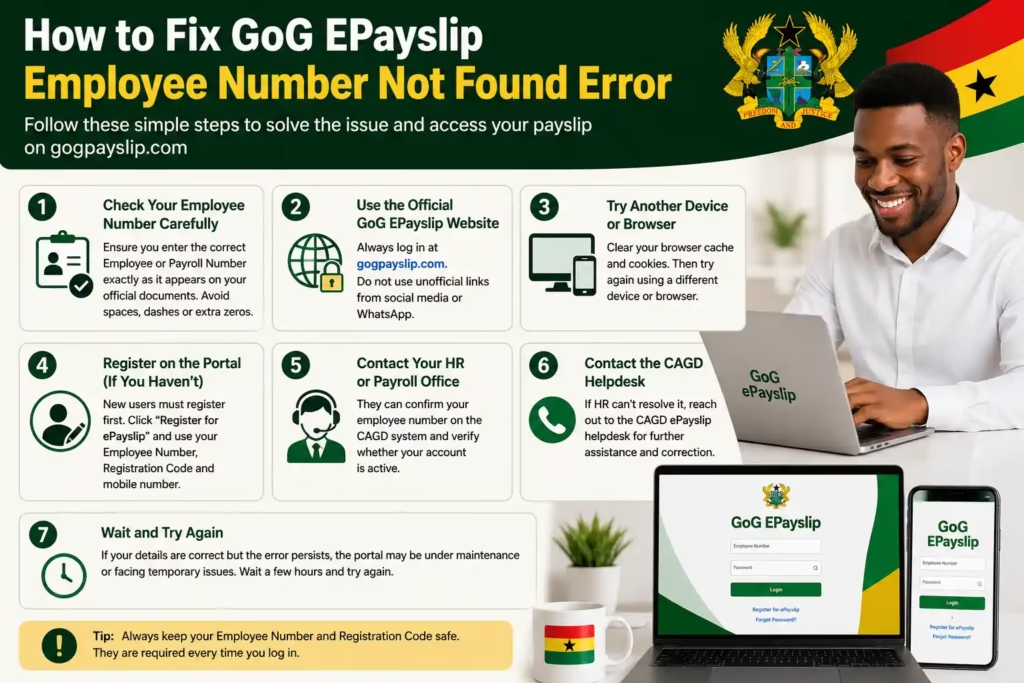
7 Easy Fixes for GoG EPayslip Employee Number Not Found Error
Check Your Employee Number Carefully
The first thing you should do is check your employee number again. A small mistake like a missing digit, extra space, or wrong number can cause the error. Your correct Payroll or Employee Number is usually written on your appointment letter, old payslip, or HR documents. Enter the number exactly as it appears in official records.
Use the Official GoG EPayslip Website
Always open the official GoG EPayslip portal at gogpayslip.com. Avoid using links shared on social media or WhatsApp groups because some may lead to fake websites. It is safer to type the website address directly into your browser.
Try Another Device or Browser
Sometimes the browser saves incorrect details automatically. Try entering your employee number manually on another device or browser. You can also clear your browser cache and cookies before trying again.
Make Sure You Have Registered First
If this is your first time using the GoG EPayslip portal, you cannot log in until you have registered. Go to gogpayslip.com, select “Register for ePayslip,” and complete the process using your employee number, registration code, and mobile number. If you are not sure how to do this, our GoGPayslip Registration Guide walks you through every step.
Contact Your HR or Payroll Office
If the problem continues, visit your HR department or payroll officer. They can confirm whether your employee number is correct in the CAGD system and check if your payroll account is active.
Contact the CAGD Helpdesk
If your HR office cannot solve the issue, contact the CAGD ePayslip support team. They can verify your payroll record and help correct any system errors linked to your account.
Wait and Try Again Later
Sometimes the GoG EPayslip portal may be under maintenance or facing temporary technical issues. If your employee number is correct but the error still appears, wait for a few hours and try again later.
CAGD Helpdesk Contact Details
If the above steps do not resolve your issue, reach out directly to the CAGD ePayslip support team:
📞 Helpdesk Line 1
0242162781
📞 Helpdesk Line 2
0552925395
📞 Helpdesk Line 3
0245289771
📧 Email Support
support@cagd.gov.gh
💡 Tip: What to Tell the Helpdesk
When calling, have ready: your full name, Ghana Card number, department/ministry name, and approximate date of employment. This helps the agent locate your record faster.
Special Case: Newly Recruited Employees
If you recently joined the Ghana Civil Service and your employee number is not being recognised, this is completely normal and does not mean something has gone wrong. Here is what is actually happening and what to do:
New employees are added to the CAGD payroll database by their department’s payroll validator. This process typically takes 4 to 8 weeks from the date your appointment letter is issued — so if you are still within that window, the best thing to do is wait and check back.
You will receive a Registration Code from your payroll validator once your record has been activated. Without this code, you cannot complete registration on the portal even if your employee number exists in the system.
In the meantime, contact your department’s HR officer or payroll validator to confirm your activation status. Once you have your Registration Code, visit gogpayslip.com and follow our GoGPayslip Registration Guide to complete the process.
Special Case: Transferred or Promoted Employees
If you were recently transferred to a new department or ministry, your employee number may have been updated in the CAGD system. Promotions to a new grade can sometimes trigger a number change as well. This catches a lot of employees off guard because no one always tells you when it happens.
After a Transfer or Promotion
Before trying to log in again, contact your new department’s HR office and ask them to confirm your current employee number on the CAGD payroll system. Using your old number will always produce the “Employee Number Not Found” error until the new one is confirmed. Once you have the correct number, you may also need to update your account details — if you run into any issues doing that, our Password Reset Guide can help you regain access.
Common Mistakes to Avoid on GoG EPayslip
FAQs
My employee number is correct but the portal still shows the error. Why?
Even when the number itself is right, the error can still appear if your payroll record is inactive, suspended, or not yet fully activated in the CAGD system. This sometimes happens after a transfer, a period of leave, or an administrative update that has not yet been processed. Contact your HR office first — they can check your account status directly in the payroll system and confirm whether CAGD needs to be involved.
I am a new employee — why can’t I find my number on the portal?
New employees are added to the CAGD portal by a payroll validator, and this process usually takes 4 to 8 weeks from the date of your appointment letter. Until your record is activated and you receive a Registration Code from your HR or payroll office, there is nothing you can do on the portal side — the system simply will not recognise your number yet. Once you have the code, see our GoGPayslip Registration Guide to complete the setup.
Where can I find my Employee Number?
Your Employee Number, also called your Payroll Number, is printed on your official government appointment letter and on any old paper payslips you may have received. If you cannot find either of those, your department’s HR or payroll officer can look it up for you directly from the CAGD records.
Can I register without a Registration Code?
No. The Registration Code is a required part of the GoG ePayslip registration process and there is no way around it. It is issued by your authorised payroll validator once your record has been activated. If you have not received yours yet, follow up with your HR office — they are the ones responsible for issuing it.
Is the “Employee Number Not Found” error the same as being sacked or removed from payroll?
Not necessarily, and in most cases it is not. The error usually points to a data mismatch or an account activation issue rather than anything serious. That said, if your HR office checks the system and confirms that your record has genuinely been removed from payroll, you will need to contact CAGD directly with your appointment letter and supporting documents to sort out reinstatement.
How long does it take CAGD to fix the error?
For straightforward data entry issues, most cases are resolved within 1 to 3 working days once reported. If your payroll record needs to be created from scratch or reactivated after a long absence, it can take 1 to 2 weeks depending on your department’s processing speed. Calling the CAGD helpdesk directly tends to get things moving faster than waiting for it to resolve on its own.
Conclusion
The Employee Number Not Found error is one of those problems that looks more serious than it usually is. In the vast majority of cases, it comes down to a typing mistake, a payroll record that has not been activated yet, or an account that still needs to be registered. Working through the fixes in this guide should resolve it for most people.
If you have tried everything here and the error is still showing, call the CAGD helpdesk at 0242162781 and have your appointment letter and Ghana Card ready — they deal with this regularly and can usually identify the cause quickly. Your salary records are safe; this is purely a portal access issue.
For help with other common account problems, our GoG EPayslip Login Guide and Password Reset Guide cover the next most common issues Ghana government employees run into.