Easy Guide to Change Teacher Union on GoG ePayslip Portal (2026)
If you are a Ghana Education Service teacher and you want to switch to a different union, you may be able to do this without visiting an office or filling out paper forms, depending on your employment category and the current payroll process. The GoG ePay Services portal may allow eligible teachers to manage certain payroll-related services online. However, the availability of the Teacher Union change option may depend on your employment category, account status, and the current payroll process. Always follow the instructions displayed on the portal and confirm important details through the relevant official support channel.
Your choice of teacher union matters more than many people realise. It affects your monthly deductions, the loan limits available to you, welfare support, and how well you are represented professionally.
This guide walks you through exactly how to change your Teacher Union on the GoG ePayslip portal, compares the major unions in Ghana so you can make an informed decision, and covers the most common problems teachers run into along the way.
Change Teacher Union on GoG ePayslip: What Is the Change of Association Option?
The Change of Association Form is the official online form on the GoG ePay Services portal that GES teachers use to switch from one union to another. Once you submit it, the request is sent to the Controller and Accountant-General’s Department (CAGD) for review. After processing, your payroll record is expected to reflect the new union for future deductions.
Before the portal existed, teachers had to submit paper forms through their school or district office — a process that could take weeks. Today the same request can be done online in a few minutes. That said, you do need an active GoG ePay Services account before you can access the form. If your account is not yet set up, sort that out first before attempting the union change.
Change Teacher Union on GoG ePayslip: Compare All Teacher Unions in Ghana
Before you change your Teacher Union on GoG ePayslip, compare the major teacher unions in Ghana. Monthly dues, welfare benefits, loan opportunities, and member support can vary significantly. Choosing the right union can help you maximize both professional support and financial benefits.
Union
Monthly Dues
Total Deduction
Max Loan Limit
Best For
GNAT Ghana National Association of Teachers
GH₵32.84
~GH₵84.84
High
All Teachers
NAGRAT National Association of Graduate Teachers
GH₵33.86
~GH₵83.86+
GH₵40,000
Graduate Teachers
CCT-Ghana Coalition of Concerned Teachers Ghana
GH₵20
~GH₵40
GH₵10,000
Advocacy
ATAG All Teachers Alliance Ghana
GH₵15
GH₵15–25
Limited
Low Cost
Innovative Teachers
GH₵5
~GH₵5
Limited
Lowest Dues
TEWU Teachers and Educational Workers Union
Varies
Varies
TUC Schemes
Non-GES Workers
Important: Always confirm the latest union dues, welfare contributions, loan limits, and member benefits before submitting your request to change your Teacher Union on GoG ePayslip.
What You Need Before You Change Your Teacher Union on GoG ePayslip
Before starting the process, make sure you have everything ready. Having these details prepared in advance will help you complete your Teacher Union change request quickly and avoid unnecessary delays.
✔ An active GoG ePay Services account — if you have not registered yet, see our GoGPayslip Registration Guide first.
✔ Your Employee Number — this is the 6-digit number on your payslip. If the system is not recognising it, check our Employee Number Not Found guide.
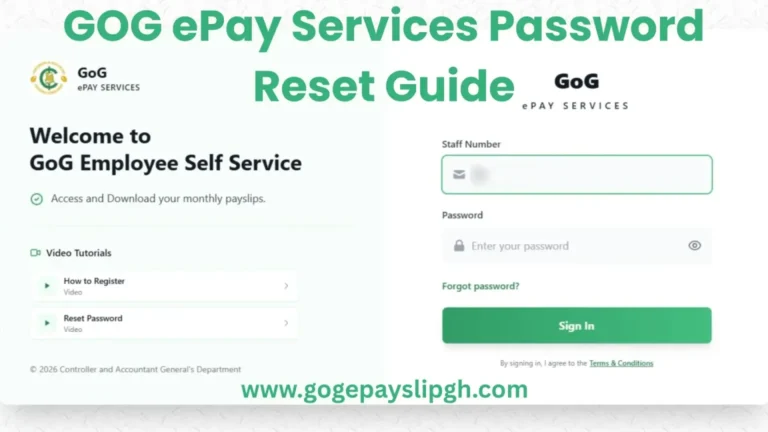
✔ Your login password — if you have forgotten it, use our Password Reset Guide before starting.
✔ Your registered mobile phone number — you may receive an OTP during the process, so make sure the number is active.
✔ A stable internet connection — mobile data or Wi-Fi both work fine.
✔ Your Ghana Card details — may be required for identity verification depending on your account status.
✔ The name of the union you want to join — review the comparison table above before deciding so you are confident in your choice.
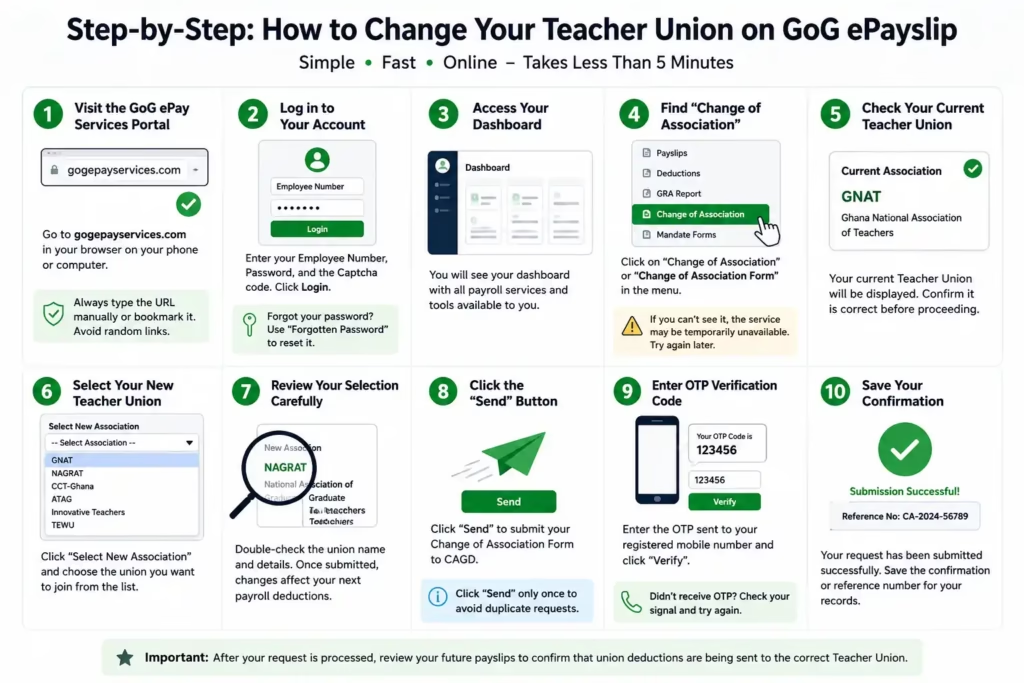
How to Change Teacher Union on GoG ePayslip: Step-by-Step Guide
The steps below outline the general process for changing your Teacher Union online. The available options and verification steps may vary depending on your account, employment category, and the current portal design. Follow the instructions shown on the official portal itself for anything that differs from this guide.
Tip: If you have forgotten your password, sort it out first using our Password Reset Guide before continuing.
Step 2: Access Your Dashboard
After logging in, you will be taken to your personal dashboard. This is where you can access payroll services, payslips, reports, and account management options.
Step 3: Open the Change of Association Form
Look for the “Change of Association” option in the dashboard menu and click it to open the Teacher Union change form.
Note: If you cannot find this option, check again later or contact the relevant support team for assistance.
Step 4: Verify Your Current Union Details
The system may display your current Teacher Union information. Review these details carefully and make sure they are correct before proceeding.
Step 5: Select Your New Teacher Union
Choose your preferred Teacher Union from the list of available associations. Take your time and make sure you select the correct union before moving to the next step.
Step 6: Review Your Request
Before submitting, double-check all information on the screen. Confirm that the selected union is correct and that there are no errors in your details.
Step 7: Submit the Form
Click the “Send” or “Submit” button to send your Change of Association request for processing.
Important: Submit the form only once to avoid duplicate requests.
Step 8: Complete OTP Verification
You may receive a One-Time Password (OTP) on your registered mobile number. Enter the code when prompted to verify your identity and complete the request.
Step 9: Save Your Confirmation
Once your request has been submitted successfully, save any confirmation message, reference number, or screenshot for your records. This can be helpful if you need to track the status of your request later.
Step 10: Monitor Future Payroll Deductions
After your request has been processed, review your future payslips to ensure that union deductions are being directed to the correct Teacher Union.
How Long Does It Take to Change Your Teacher Union on GoG ePayslip?
After submitting your Change of Association Form, the update does not happen immediately. CAGD processes payroll changes in cycles, so the timing depends on when during the month you submitted your request.
Here is what to expect:
Month of Submission: Your request is received and enters the processing queue.
Next Payslip: The change may already appear here if your request was submitted early enough in the cycle.
Following Payslip: If it did not show up on the next payslip, it should be reflected here at the latest for most teachers.
If your deductions are still going to the old union after two full payroll cycles, do not ignore it. Check your payslip carefully and if the issue persists, contact your HR office or CAGD directly. Keep your confirmation or reference number handy — it makes the follow-up much easier. If you spot an incorrect deduction, you can also raise it through the Wrongful Deductions section of the portal.
How to Confirm the Change Was Successful
The easiest way to verify your union change is to check your future payslips. If the deduction is being sent to your new Teacher Union instead of the previous one, the update has been successfully processed.
What to Do If the “Change of Association” Option Is Missing on GoG ePayslip
If you cannot find the Change of Association option on your GoG ePayslip dashboard, don’t panic. This is a common issue that some teachers experience, and in most cases, it can be resolved without much difficulty.
1. Check That You Are Using the Correct Portal
First, make sure you are logged in to the official GoG ePay Services portal using the correct account details. Some teachers accidentally access outdated links or old bookmarks, which may not display all available features.
2. Verify Your Account Information
Certain payroll services may not be available if your account information is incomplete. Check that your profile details, employee information, and any required verification steps have been completed successfully.
3. The Feature May Be Temporarily Unavailable
From time to time, payroll systems undergo maintenance, updates, or technical improvements. During these periods, some features may temporarily disappear or become unavailable.
If the Change of Association option is missing, wait a few days and check again.
4. Confirm That You Are Eligible
The Teacher Union change feature is intended for eligible Ghana Education Service (GES) teaching staff. Depending on your employment category, the option may not appear on your account.
5. Try Another Device or Browser
Sometimes the issue is caused by a browser problem rather than your account. Try:
Refreshing the page
Clearing your browser cache
Using a different browser
Logging in from another device
What If the Option Still Doesn’t Appear?
If you have checked everything above and the Change of Association option is still missing, contact your school administration, district HR office, or the appropriate payroll support team for assistance.
Important: Do not submit multiple account registrations or create a new account just because the feature is missing. This can create verification issues and delay the resolution process.
Common Mistakes to Avoid When Changing Your Teacher Union on GoG ePayslip
Changing your Teacher Union on GoG ePayslip is usually straightforward, but a few common mistakes can delay your request or create unnecessary problems. Before you submit your Change of Association Form, keep the following tips in mind.
Best Practices
✔ Double-check the name of your new Teacher Union before submitting the form.
✔ Save a screenshot of the confirmation page or reference number for future reference.
✔ Use the official GoG ePay Services portal and make sure you are logged in to the correct account.
✔ Keep your registered mobile number active so you can receive OTP verification codes.
✔ Compare union dues, welfare benefits, loan opportunities, and member support before making your final decision.
✔ Submit your request only once and allow time for processing.
Mistakes to Avoid
❌ Submitting the same request multiple times.
❌ Selecting a union without reviewing its benefits and membership costs.
❌ Sharing your Employee Number, password, OTP, or account details with anyone.
❌ Leaving the page before the confirmation message appears.
❌ Ignoring verification errors or failed OTP messages without checking your network connection.
❌ Assuming the change is complete without checking future payslips for updated union deductions.
Important: After submitting your request, monitor your upcoming payslips to confirm that deductions are being sent to your new Teacher Union. Keeping a copy of your confirmation details can make it much easier to resolve any issues later.
FAQs
Can I change my Teacher Union more than once on the GoG ePayslip portal? Yes, you can submit another Change of Association request in the future if you decide to switch again. That said, it is worth waiting until your current change is fully processed and showing on your payslip before submitting a new one — overlapping requests can cause confusion in the payroll system.
How long does it take for the Teacher Union change to reflect on my payslip? It depends on where you fall in the payroll processing cycle. Most teachers see the update within one to two payslips after submission. If the change has not appeared after two full cycles, follow up with your HR office and have your confirmation or reference number ready to speed things along.
Will my salary amount change when I switch unions? Your basic salary and allowances stay exactly the same. What changes is the deduction amount, since different unions charge different monthly dues and welfare contributions. Before switching, use the comparison table in this guide to understand exactly what your new monthly deductions will look like.
Which teacher union has the lowest monthly dues in Ghana? According to the figures shown in our comparison table, Innovative Teachers has the lowest listed monthly dues, followed by ATAG. Confirm the latest charges directly with each union before switching, since lower dues usually come with fewer benefits and a smaller loan limit.
Is there any fee charged by CAGD to change my Teacher Union? No. Submitting a Change of Association request through the GoG ePay Services portal is free. If anyone is asking you to pay a fee to process this change, do not proceed — that is not an official requirement.
What happens to my old union dues and mutual fund after I switch? The change only affects future deductions going forward. Any savings, mutual fund contributions, or welfare balances with your previous union remain subject to that union’s own policies. Get in touch with your former union directly if you need clarity on refunds, transfers, or what happens to accumulated benefits.
Can a non-teacher government worker use this form to change association? This feature is designed specifically for eligible GES teaching staff. If you are a non-teaching government employee and the option does not appear on your dashboard, contact your HR department or payroll administrator — they can advise on the correct process for your employment category.
My preferred union is not listed in the dropdown. What should I do? Start by refreshing the page and logging in again, since this can sometimes be a display issue. If the union still does not appear after that, contact your HR office or CAGD to confirm whether the union is currently registered and active on the portal. Do not select a different union just to complete the form — wait until the correct one is availabl
Confirm the current phone contact details directly on the official CAGD website before calling, as numbers may change.
Conclusion
Changing your Teacher Union on GoG ePayslip is a straightforward process once your account is active and you have your details ready. The key is to take your time before submitting — compare the unions, double-check your selection, and save your confirmation once the form goes through.
After that, keep an eye on your next couple of payslips to make sure the deductions are going to the right place. If anything looks off, the Wrongful Deductions guide is a good starting point for raising the issue.
Easy GoG ePayslip Password Reset Guide 2026 If you have forgotten your password or are locked out of your GoG ePay Services account this guide will get you back in within minutes. The CAGD portal has a straightforward password reset process built in — all you need is your Employee Number, your registered mobile number,…
How to Login to GoG ePayslip Account and Check Payslip Online (2026 Guide) If you are a Ghana government employee trying to log in to the GoG EPayslip portal for the first time — or running into problems with your login — this guide covers everything you need. From the basic requirements to common errors…
GoGPayslip Registration Guide 2026 for Ghana Government Employees If you are a Ghana government employee and you have never logged into the GoGPayslip portal before, registration is the first thing you need to do. It is a one-time process, and once your account is set up, you can access your monthly payslips, tax reports, and…
Easy GoG ePay Services Mobile App Guide 2026 – Download & Login If you are a Ghana government employee and you want a faster way to check your payslip without opening a browser every time, the GoG ePay Services mobile app is worth having on your phone. It connects directly to the same CAGD payroll…
Ghana Salary Structure 2026: Complete Guide to SSSS, SSNIT, PAYE & GoG EPayslip If you are a Ghana government employee, understanding how your salary is calculated is very important. This guide works alongside our main GoG EPayslip Portal guide, which covers login, registration, and using the portal day to day. Every month, your payslip shows…
GoG ePayslip Loan Affordability Guide 2026 – Easy Loan Check Before you walk into a bank or microfinance company to apply for a loan, there is one thing every Ghana government employee should do first — check their loan affordability on the GoG EPayslip portal. The portal has a built-in tool called “My Affordability” that…