How to Report Wrongful Deductions on GoG EPayslip Portal Ghana 2026
GoG EPayslip Wrongful DeductionsIf you have ever looked at your payslip and noticed an amount being deducted that you did not authorize — or a loan that finished months ago still being taken from your salary — you are dealing with a wrongful deduction. It is one of the most common payroll complaints among Ghana government employees, and the frustrating part is that it can quietly continue for months if you do not catch it.
The good news is that the GoG EPayslip portal has a dedicated feature for reporting and resolving these issues directly through CAGD.. This guide explains how to spot wrongful deductions on your payslip, how to report them through the portal, and what to do if the problem is not resolved quickly. If you need help accessing your account first, see our GoG EPayslip Login Guide before continuing.
What Are GoG EPayslip Wrongful Deductions?
A wrongful deduction is any amount taken from your Ghana government salary without your authorization, calculated at the wrong rate, or still running after it should have stopped. These are not rare edge cases — they happen regularly across the public sector and often go unnoticed for months because employees only check the net figure on their payslip rather than reviewing each deduction line.
The most common types reported through the CAGD EPayslip portal include loan repayments that continued after full settlement, union dues still being deducted after membership was cancelled, unauthorized third-party deductions, incorrect PAYE tax calculations, SSNIT contribution errors, and Tier 2 pension contributions going to the wrong fund trustee. If any deduction on your payslip does not match your employment terms or something you personally authorized, it needs to be investigated and reported. Our Ghana Salary System 2026 guide explains how each deduction should be calculated if you want to cross-check the figures.
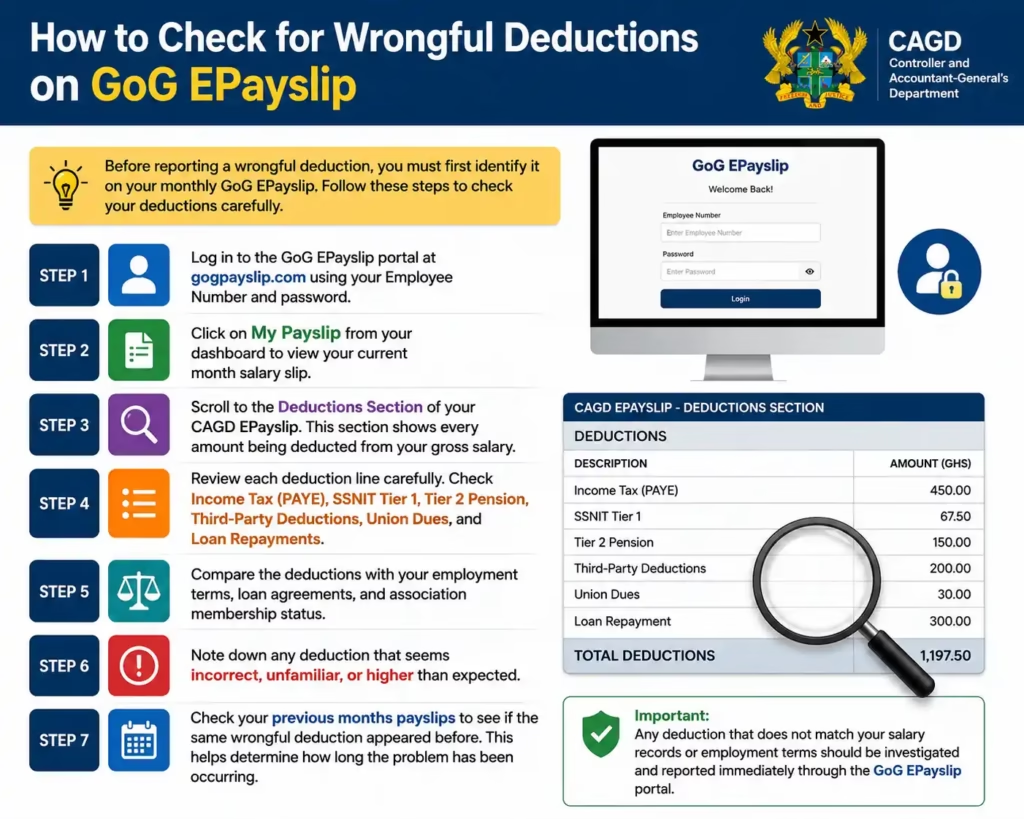
How to Check for Wrongful Deductions on GoG EPayslip
Before reporting a wrongful deduction, you must first identify it on your monthly GoG EPayslip. Follow these steps to check your deductions carefully.
Step 1: Log in to the GoG EPayslip portal at gogpayslip.com using your Employee Number and password.
Step 2: Click on My Payslip from your dashboard to view your current month salary slip.
Step 3: Scroll to the Deductions Section of your CAGD EPayslip. This section shows every amount being deducted from your gross salary.
Step 4: Review each deduction line carefully. Check Income Tax (PAYE), SSNIT Tier 1, Tier 2 Pension, Third-Party Deductions, Union Dues, and Loan Repayments.
Step 5: Compare the deductions with your employment terms, loan agreements, and association membership status.
Step 6: Note down any deduction that seems incorrect, unfamiliar, or higher than expected.
Step 7: Check your previous months payslips to see if the same wrongful deduction appeared before. This helps determine how long the problem has been occurring.
How to Report Wrongful Deductions on GoG EPayslip Portal
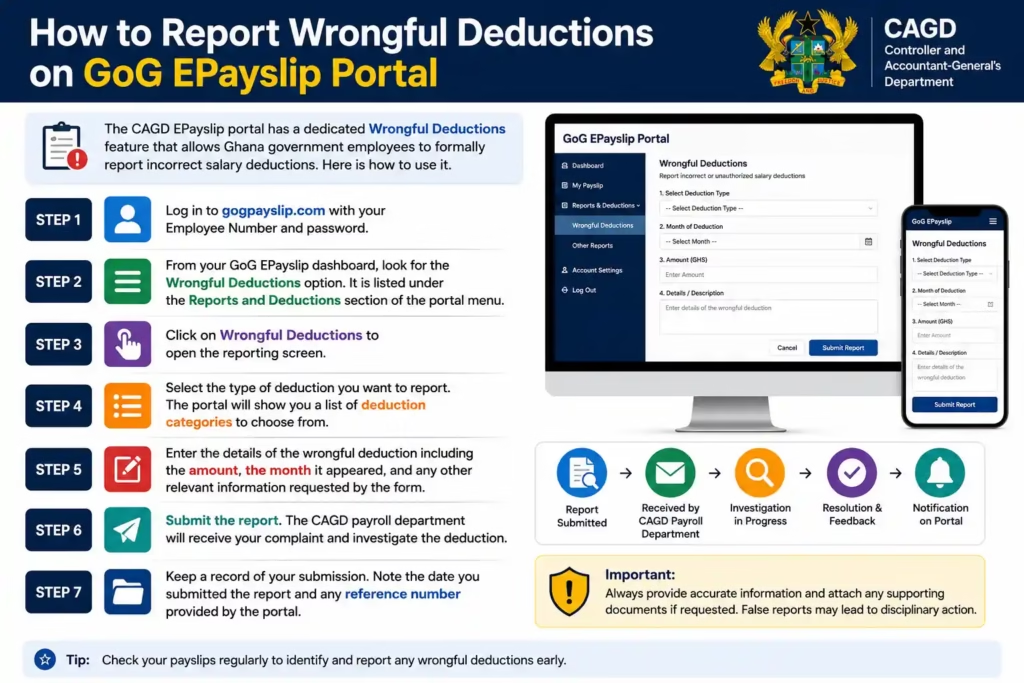
The CAGD EPayslip portal has a dedicated Wrongful Deductions feature that allows Ghana government employees to formally report incorrect salary deductions. Here is how to use it.
Step 1: Log in to gogpayslip.com with your Employee Number and password.
Step 2: From your GoG EPayslip dashboard, look for the Wrongful Deductions option. It is listed under the Reports and Deductions section of the portal menu.
Step 3: Click on Wrongful Deductions to open the reporting screen.
Step 4: Select the type of deduction you want to report. The portal will show you a list of deduction categories to choose from.
Step 5: Enter the details of the wrongful deduction including the amount, the month it appeared, and any other relevant information requested by the form.
Step 6: Submit the report. The CAGD payroll department will receive your complaint and investigate the deduction.
Step 7: Keep a record of your submission. Note the date you submitted the report and any reference number provided by the portal.
How to Check Third-Party Deductions on GoG EPayslip
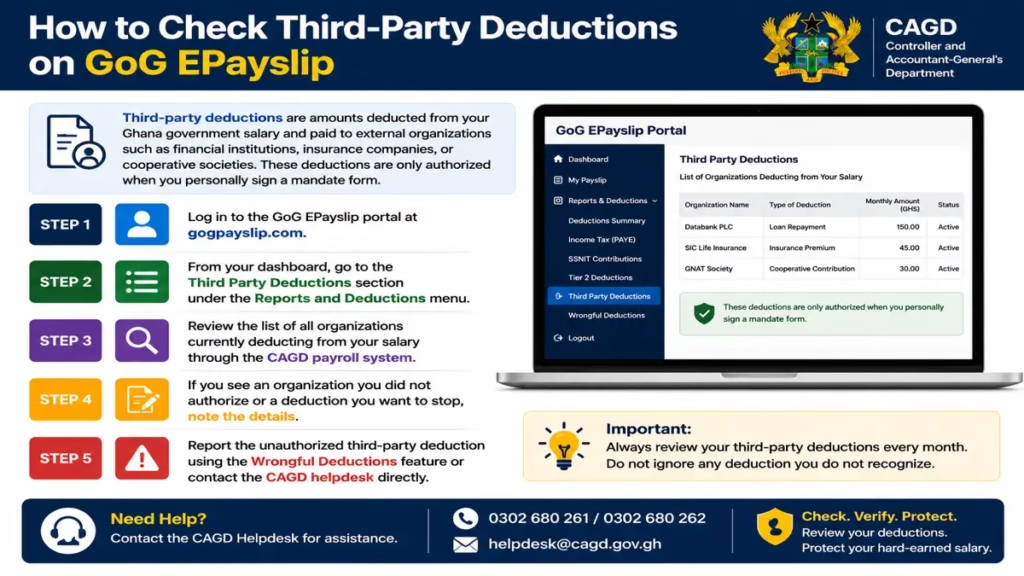
Third-party deductions are amounts deducted from your Ghana government salary and paid to external organizations such as financial institutions, insurance companies, or cooperative societies. These deductions are only authorized when you personally sign a mandate form.
Step 1: Log in to the GoG EPayslip portal at gogpayslip.com.
Step 2: From your dashboard, go to the Third Party Deductions section under the Reports and Deductions menu.
Step 3: Review the list of all organizations currently deducting from your salary through the CAGD payroll system.
Step 4: If you see an organization you did not authorize or a deduction you want to stop, note the details.
Step 5: Report the unauthorized third-party deduction using the Wrongful Deductions feature or contact the CAGD helpdesk directly.
How to Check Tier 2 Pension Deductions on GoG EPayslip
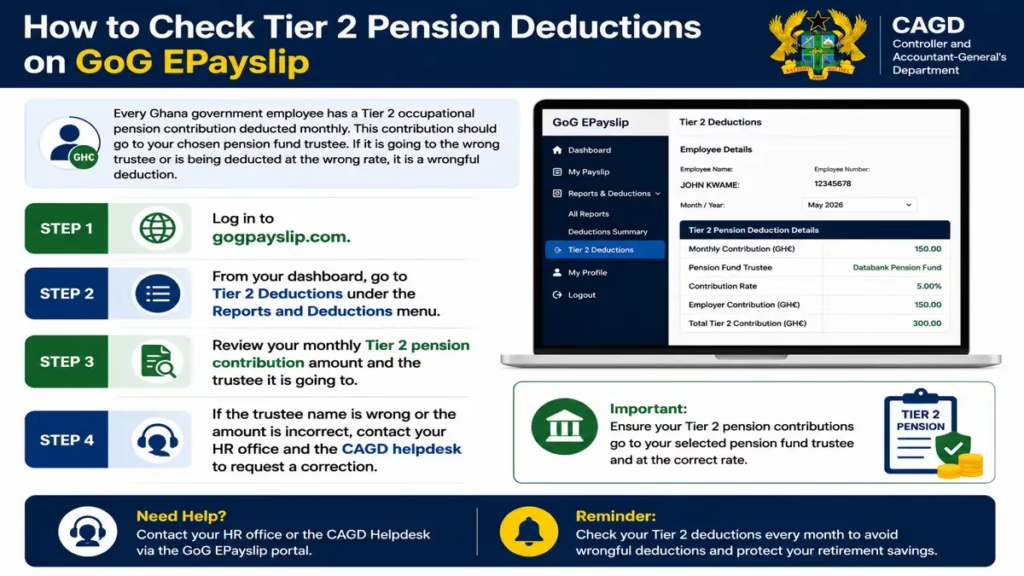
Every Ghana government employee has a Tier 2 occupational pension contribution deducted monthly. This contribution should go to your chosen pension fund trustee. If it is going to the wrong trustee or is being deducted at the wrong rate, it is a wrongful deduction.
Step 1: Log in to gogpayslip.com.
Step 2: From your dashboard, go to Tier 2 Deductions under the Reports and Deductions menu.
Step 3: Review your monthly Tier 2 pension contribution amount and the trustee it is going to.
Step 4: If the trustee name is wrong or the amount is incorrect, contact your HR office and the CAGD helpdesk to request a correction.
Common Wrongful Deduction Problems on GoG EPayslip
Loan Deduction Continuing After Full Repayment
This is one of the most common wrongful deduction complaints reported by Ghana government employees on the GoG EPayslip portal. If your loan has already been fully repaid but deductions are still appearing on your CAGD EPayslip, report the issue immediately using the Wrongful Deductions feature on gogpayslip.com. You should also contact your bank, savings institution or loan provider to confirm that the loan account has been officially closed in the CAGD payroll system.
Union Dues Still Deducted After Membership Cancellation
Some government workers in Ghana continue seeing union or association deductions on their GoG EPayslip even after cancelling membership. If this happens, submit a Change of Association Form through the CAGD EPayslip portal and report the deduction as wrongful at the same time — do not wait for one to resolve before doing the other. Teachers specifically can follow our guide on changing your Teacher Union on GoG ePayslip for the exact steps. Delayed reporting can result in multiple months of incorrect deductions that are harder to recover.
Unknown Third-Party Deductions on Your Payslip
If you notice a deduction from an organization, company or association you do not recognize, it may be a payroll processing error within the CAGD system. Check the deduction details carefully on your GoG EPayslip dashboard and report the issue immediately through the Wrongful Deductions section. You should also contact the CAGD helpdesk for further investigation and correction.
Incorrect Income Tax (PAYE) Deduction
If your PAYE tax deduction suddenly becomes much higher than normal, the first step is to download your GRA tax report from the portal and check the figures. Incorrect salary grading, a promotion update that was processed incorrectly, or a payroll system error can all affect your income tax calculation. Our GRA Tax Report guide explains how to access and read that report. If the figures confirm the deduction is wrong, report it through your HR office and the CAGD EPayslip system straight away..
Missing Salary Allowances
Many Ghana government employees report missing allowances after transfers, promotions or payroll updates. Housing allowance, transport allowance, professional allowance and responsibility allowance may sometimes fail to appear on the GoG EPayslip dashboard. Review your payslip carefully every month and report any missing payment immediately to your HR office and the CAGD helpdesk before the payroll cycle closes.
Tips to Protect Yourself from Wrongful Deductions
Check your EPayslip every month- not just the net figure
Many Ghana government employees glance at their net salary and move on. That habit lets wrongful deductions quietly run for months. Open your GoG EPayslip and scroll through every line in the deductions section before you close it.
Download and archive a copy of every payslip
Keeping a personal record of past CAGD EPayslips gives you a clear paper trail. When an unknown deduction appears, you can compare with last month’s slip, pinpoint exactly when it started, and calculate the total amount wrongfully taken.
Never sign a mandate form you do not fully understand
Every third-party deduction on your salary starts with a mandate form — a document that authorizes an organization to collect directly from CAGD. Read it carefully. Ask what will be deducted, for how long, and what the cancellation process is. Your signature is your legal consent. If you are unsure how mandate forms work, our GoGPayslip Mandate Form guide explains the full process.
Report wrongful deductions immediately — every month of delay costs you
The longer a wrongful deduction continues, the harder it becomes to recover the full amount. As soon as you spot something that does not match your authorized deductions, raise it with your HR department or the relevant CAGD office right away.
Keep a personal list of every deduction you have actually authorized
Write down every loan, union fee, insurance, or cooperative contribution you have signed up for — including the agreed monthly amount and end date. Cross-check this list against your payslip each month. Anything on your payslip that is not on your list is a red flag worth investigating.
Know your rights — deductions must be authorized and documented
Under Ghana’s labour laws and CAGD regulations, no deduction can be made from your salary without your written consent. If a deduction appears without a corresponding mandate form that you signed, you have grounds to formally dispute it. Your HR unit is obligated to investigate and provide documentation.
Talk to colleagues — payroll errors often affect multiple people at once
Wrongful deductions linked to a single supplier or system error frequently hit several employees in the same department or pay group at the same time. If you notice something wrong, check with colleagues. A group complaint is taken more seriously and resolved faster than an individual one.
CAGD EPayslip Helpdesk — Contact for Wrongful Deductions
If you encounter any problem with your GRA tax records on the GoG EPayslip portal, contact the CAGD helpdesk for assistance.
CAGD Helpdesk Phone Numbers:
CAGD Main Office Phone: +233 (0) 302983507
CAGD Postal Address: P.O. Box M79, Ministries, Accra, Ghana, GPS: GA-110-7376
Portal Access: gogpayslip.com
FAQs
What should I do if I see an unknown deduction on my GoG EPayslip?
Log in to the portal, go to the Wrongful Deductions section, and submit a report with the deduction details including the amount, the month it appeared, and the organization name if visible. Do not wait to see if it corrects itself — report it in the same month you spot it. You can also call the CAGD helpdesk on 0242162781 if you want to follow up directly.
Can I get my money back after reporting a wrongful deduction?
Yes. If CAGD confirms the deduction was unauthorized or incorrect, the amount should be refunded through a future salary payment. Make sure you keep a record of your submission date and any reference number the portal provides — you will need these if there is any dispute about the refund amount or timing.
How do I get proof of tax payment from GoG EPayslip?
Log in to the portal, go to My GRA Report, select the relevant tax year, and download the report. This shows your complete PAYE payment history and is accepted as proof of tax compliance. Our GRA Tax Report guide walks through how to access and read it in detail.
Can a third-party organization deduct from my salary without my knowledge?
No. Every third-party deduction must be backed by a signed mandate form that you personally authorized. If a deduction is appearing on your payslip from an organization you did not sign anything with, that is a wrongful deduction and needs to be reported to CAGD immediately. You can read more about how mandate forms work in our GoGPayslip Mandate Form guide.
What is the difference between Third-Party Deductions and Wrongful Deductions on GoG EPayslip?
Third-Party Deductions is a section on your dashboard where you can see every external organization currently deducting from your salary — banks, insurance providers, cooperatives, and so on. Wrongful Deductions is the separate feature you use to formally flag and report any deduction that should not be there. Think of the first as a viewing tool and the second as the reporting tool. Both are available from the Reports and Deductions section of the portal menu.
Conclusion
Wrongful deductions can quietly reduce your take-home pay for months when left unchecked. The GoG EPayslip portal gives every Ghana government employee a direct way to identify and formally report incorrect deductions through the dedicated Wrongful Deductions feature. Make it a habit to review every line on your payslip each month — not just the net figure — and raise any issue as soon as you spot it.
If you cannot access your account, our Password Reset Guide will help you regain access. For broader questions about how your salary and deductions are structured, the Ghana Salary System 2026 guide is a good reference point.
This website shares independent information about the GoG EPayslip system to help Ghana government employees. It is not officially connected to the Government of Ghana or CAGD.